

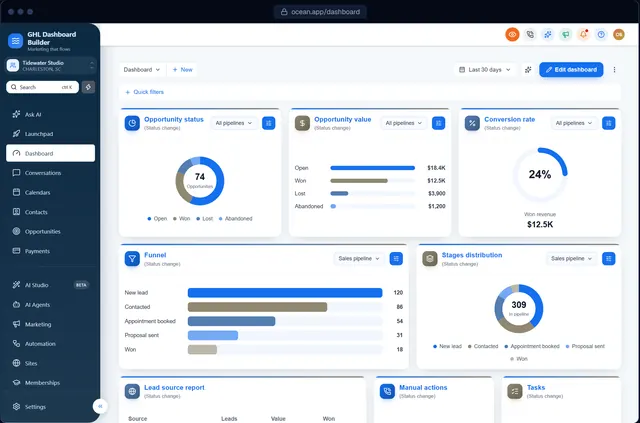
A dental group in Monterrey signs up for your platform. The office manager switches GoHighLevel to Spanish, and most of the screen changes. Then a workflow opens in English. The sidebar says Contactos, but the team has said pacientes for twenty years. And the colors, the logo and the wording still look like the same software a competing agency down the street sells. The manager asks you: “Is this really in Spanish, and is this really yours?”
This guide answers both parts for GoHighLevel in Spanish. It covers what HighLevel (also called GoHighLevel or GHL) shows in Spanish natively today, where the native translation stops, what a branded Spanish menu adds on top, which Spanish to use for clients in Spain, Mexico or the United States, how dates, numbers and currencies should look, what happens to Spanish SMS, WhatsApp and email, and a step-by-step setup. GHL Dashboard Builder is an independent design service and is not affiliated with HighLevel; where our product helps, we say exactly what it does and where it stops.
Can GoHighLevel be used in Spanish today?
Yes. Spanish is one of HighLevel’s built-in platform languages. Each sub-account has a default language, and each user can override it for themselves. Where a piece of the interface has not been translated yet, HighLevel shows the English text instead, so the result is mostly Spanish, not completely Spanish.
Where the native setting lives
HighLevel’s help center article on internationalization describes two levels:
- The sub-account default. In a client’s sub-account, open Settings, Business Profile and choose Platform Language. Everyone in that sub-account sees this language unless they pick another one.
- The user’s own choice. Each user can open Settings, My Profile and choose their own Platform Language. The user’s choice takes priority over the sub-account default.
A sub-account is one client’s workspace in HighLevel; HighLevel also calls it a location. The language list in that article is made up of European languages: Spanish, French (France and Canada), German, Portuguese, Italian, Dutch, Swedish, Danish, Finnish and Norwegian at the time of writing. The same article explains that text without a translation falls back to English.
What agencies have asked HighLevel for
The native Spanish setting is real progress, and agencies with Spanish-speaking clients asked for it publicly. A request to translate HighLevel into Spanish on HighLevel’s ideas board asked for a Spanish interface, and a user there describes screens that mix Spanish steps with English processes.
A second request goes further. It asks HighLevel to improve translations and add an option for custom translation, and commenters name Spanish among the languages whose translations they find weak. That request shows the gap this guide is about: agencies do not only want Spanish, they want Spanish that sounds like their client’s business and that they can correct themselves. At the time of writing, HighLevel’s native setting does not let you rewrite its translated labels.
If you are new to branding HighLevel at all, start with our guide to white-labeling HighLevel, which explains the logo, domain and custom code settings this article builds on.
What does HighLevel’s native Spanish cover, and what stays in English?
HighLevel’s native Spanish translates much of the web interface for users who choose it, with English shown wherever a translation is missing. Your clients’ customer-facing content, such as SMS, emails, forms and funnels, is Spanish only if someone writes it in Spanish. Branding and industry wording are not part of the language setting at all.
That split matters before a sale. A client who expects every screen to be Spanish will find English somewhere, sooner or later. An independent review by SupplyGem of GoHighLevel’s language options reports that translations are not always accurate and that some areas, such as automations, still appear largely in English. HighLevel ships changes often, so treat any list of untranslated screens as a snapshot and check the screens your client actually uses.
| Part of GoHighLevel | Native Spanish today | With a branded Spanish theme | Who controls the words |
|---|---|---|---|
| Left menu (sidebar) and its 19 items | Yes, HighLevel’s standard translation | Yes, in your wording, with industry renames | You, through the theme |
| Header search, notifications, profile menu | Mostly, where translated | Yes, for the parts the theme restyles | You, through the theme |
| Text inside HighLevel’s own pages | Mostly, with English fallback | Unchanged, follows the user’s Platform Language | HighLevel |
| Workflow, funnel, website and email builders | Partly; some areas still English | Unchanged | HighLevel |
| Colors, fonts, logo placement, layout | Not part of the language setting | Yes, your brand across the dashboard | You |
| SMS, WhatsApp and email content | Any language you type | Not affected | You or the client |
| Forms, surveys, funnels, booking pages | Any text you write | Not affected | You or the client |
| HighLevel’s mobile app | Follows HighLevel | Not affected | HighLevel |
| System emails and notifications | Follows HighLevel | Not affected | HighLevel |
Why the two layers work together
The native setting and a theme do different jobs. HighLevel’s Platform Language decides the text inside HighLevel’s own pages, for each user. A theme decides how the dashboard looks and what the menu and navigation say, for each sub-account it covers. The best Spanish setup for most clients uses both: Spanish as the Platform Language so inner pages read in Spanish where HighLevel has translated them, and a branded Spanish menu so the screen the team opens every morning carries your brand and their words.
This is different from Arabic, Urdu and Hebrew, where HighLevel offers no built-in language at all and no right-to-left layout. For those languages the theme carries the whole interface layer; see our guide to an Arabic, right-to-left HighLevel dashboard and our Hebrew dashboard guide. For Spanish, the value of a theme is not translation from nothing. It is control: your brand, your client’s words and labels you can change in minutes.
Why add a branded Spanish menu if HighLevel already speaks Spanish?
Because HighLevel’s Spanish translates HighLevel’s own vocabulary, which is the same for every business. A branded menu speaks your client’s vocabulary, carries your brand, and lets you fix a word the day a client complains about it. For an agency selling HighLevel as its own software, those three things are the difference between “translated” and “ours”.
Generic words versus your client’s words
HighLevel calls every person a contact and every deal an opportunity, in every language. A Spanish-speaking dental clinic thinks in pacientes and tratamientos. A real estate office thinks in propiedades or inmuebles. A gym thinks in socios or miembros. When the menu uses the client’s own words, staff find things faster and training takes less time, because the software matches how the business already talks.
Your brand instead of a reseller’s look
The language setting changes words, not appearance. An agency that resells HighLevel under its own name still shows the same layout and colors as every other HighLevel reseller in the same city. A theme puts your color system, fonts, sidebar, header, cards and buttons across the dashboard, so a client switching to Spanish sees your platform in Spanish, not HighLevel in Spanish.
Labels you can correct yourself
When a client says “nobody here says Panel, we say Inicio”, the native setting gives you no way to change it. A theme does: you rename the label, deploy, and the menu updates. That matters most in Spanish, because the right word for a team in Madrid is often not the right word for a team in Bogotá or Los Angeles, as the vocabulary section below shows.
Spanish is also a large market for agencies. The Instituto Cervantes’ 2025 yearbook counts about 635 million people who can speak Spanish, including about 520 million native speakers, as reported by La Nación’s coverage of the Instituto Cervantes yearbook. Many of those speakers run or staff the small service businesses that HighLevel agencies serve.
Native speakers are part of the total of potential speakers. Source: Instituto Cervantes, El español en el mundo 2025, as reported by La Nación (October 2025).
How does GHL Dashboard Builder put GoHighLevel in Spanish?
GHL Dashboard Builder translates GoHighLevel’s menu and navigation into Spanish in your brand, lets you rename any menu item in your own Spanish wording, can limit the Spanish design to chosen sub-accounts, and installs as one CSS line and one JavaScript line in HighLevel’s custom code settings. Text inside HighLevel’s own pages keeps following each user’s Platform Language.
GHL Dashboard Builder is an independent design service that turns the standard HighLevel (GoHighLevel) dashboard into a branded platform: your colors, menu, login design, privacy mode and your clients’ language, installed with two lines of code. For Spanish, the relevant pieces are the built-in Spanish language pack, the menu editor, sub-account targeting, the templates and the install itself.
What the Spanish setup includes
- A neutral Spanish pack. The menu, the sidebar’s search and sub-account switcher, the header’s search box, notifications and profile menu, common buttons and the tab names our theme shows are translated into neutral Spanish. Spanish is one of 15 languages; 3 of them (Arabic, Urdu and Hebrew) read right to left, and Spanish uses the normal left-to-right layout.
- Your own wording. Override any translated label, so a team in Spain sees Añadir instead of Agregar, and a clinic sees Pacientes instead of Contactos.
- Menu editor. Rename, reorder, hide and badge any of HighLevel’s 19 menu items, and add your own items.
- Templates. Start from one of 27 templates, including industry designs such as the Clinic template and the Estate template, then set the language to Spanish.
- One sub-account or a few. Limit the Spanish design to the clients who need it, from one install.
- No data access. The builder never connects to your HighLevel account and the installed code does not send data anywhere.
At a glance: features, what they do, which plan
| Feature | What it does for your Spanish-speaking clients | Plan |
|---|---|---|
| Languages | Menu and navigation in Spanish, with your own wording for any label | Pro and Agency |
| Menu editor | Rename, reorder, hide and badge the 19 menu items: Pacientes, Propiedades, Socios | Pro and Agency |
| Brand and colors, fonts | Your color system and fonts across the dashboard | All plans |
| Templates | 27 finished looks, including industry designs, as a starting point | All plans |
| Single sub-account | The Spanish design only for chosen sub-accounts, by link or Location ID | All plans |
| Login page design | 12 login designs in your colors, designed with you for your sign-in screen | Pro and Agency |
| Two-line install | One CSS line and one JavaScript line; changes go live with Deploy to live | All plans (we install it on Pro and Agency) |
All three plans are one-time payments with no monthly fee. Starter ($180) gives you one branded design from any of 27 templates, without the language section. Pro ($280) adds up to 3 designs, the menu editor, the dashboard in Spanish or any of the other 14 languages, the branded login page and installation by us. Agency ($880) adds up to 100 designs, a look designed by our team, custom code and lifetime updates. Starter and Pro include 12 months of updates, then optional at $99 a year. Current details are on the pricing page.
The Spanish menu and the menu editor are included from Pro. Source: GHL Dashboard Builder pricing, October 2026. All three plans are one-time payments with no monthly fee.
What the client sees afterwards
After installation, a user in the Spanish sub-account logs in on your white-label domain and sees the sidebar in your colors, with labels such as Conversaciones, Calendarios and Contactos, or the renames you chose, such as Pacientes. The header search box reads “Buscar contactos, negocios, conversaciones…”. When they open a settings page or a builder, they see HighLevel’s own text in the Platform Language they chose, which for most of the interface is Spanish and for some screens is still English. You can click through a live Spanish preview on our Spanish language page.
Native Spanish or a branded Spanish menu: which should you use?
For most agencies, both. Set HighLevel’s Platform Language to Spanish so inner pages read in Spanish, and add a branded menu when the client pays for your platform rather than for HighLevel access. Native Spanish alone is enough for internal teams and clients who do not care whose software it is.
The table below sets out the trade-offs honestly. The native setting costs nothing and covers more screens. A theme covers fewer screens but controls the ones that shape the client’s impression.
| Question | Native Platform Language only | Native Spanish plus a branded Spanish menu |
|---|---|---|
| Cost | Included in HighLevel | One-time plan from $280 for the language section |
| Screens covered | Much of the web interface, with English fallback | The same, plus your wording in the menu and navigation |
| Industry words (Pacientes, Propiedades) | No | Yes, through the menu editor |
| Your colors, fonts and layout | No | Yes |
| Fixing a label the client dislikes | Wait for HighLevel | Rename it and deploy |
| Spain versus Latin American wording | One Spanish for everyone | Your choice per design |
| Different users in one sub-account | Each user picks a language | One menu wording per design; inner pages still follow each user |
| Mobile app and system emails | Follow HighLevel | Unchanged |
| Maintenance | None | A theme refresh can be needed after a big HighLevel update |
When native Spanish alone is the right call
Native Spanish alone is fine for your own internal team, for clients who know they are using HighLevel, and for short projects where branding does not matter. It is also the right first step for every Spanish client, because it costs nothing and covers inner pages a theme never touches.
When a branded menu earns its place
A branded Spanish menu earns its place when you sell HighLevel under your own name, when the client works in a niche with its own vocabulary, or when the client has already complained about a translated word. It also helps when you run SaaS mode, because a reseller dashboard in generic Spanish still looks like a reseller dashboard. Our guide to GoHighLevel dashboard customization explains everything else you can change beyond language.
Which Spanish should the GoHighLevel menu use: Spain, Mexico or neutral?
Use the Spanish your client’s team speaks. Spain and Latin America share grammar but differ in common software words, in how formally software addresses the user, and in number formats. Neutral Spanish works for mixed teams; a Spain or Mexico variant feels more natural when the whole team is from one country.
Words that differ
Most menu nouns are the same everywhere: Conversaciones, Calendarios, Contactos, Pagos. The differences show up in verbs on buttons and in everyday tech words. GHL Dashboard Builder’s Spanish pack uses neutral Spanish that leans toward Latin American usage on a few buttons, such as Agregar for “Add”. A team in Spain usually says Añadir. The table shows common choices; neither column is wrong.
| English | Neutral pack label | Often preferred in Spain | Often preferred in Mexico and Latin America |
|---|---|---|---|
| Dashboard | Panel | Panel or Inicio | Panel or Tablero |
| Add | Agregar | Añadir | Agregar |
| Settings | Configuración | Ajustes or Configuración | Configuración |
| Mobile phone (in forms) | (not a menu label) | Móvil | Celular |
| Computer (in help text) | (not a menu label) | Ordenador | Computadora |
| Book an appointment | (not a menu label) | Pedir cita or Reservar | Agendar cita |
| Pipelines (tab) | Embudos | Embudos or Procesos de venta | Embudos or Pipelines |
One word to watch: Embudos
In the neutral pack, both the Pipelines tab under Opportunities and the Funnels tab under Sites read Embudos, because Spanish speakers use embudo for both a sales pipeline and a marketing funnel. That is correct Spanish, but it can confuse a new user. If your client’s team uses both features, rename one of them, for example Procesos de venta for pipelines, so each word points to one place.
Tú or usted
Spanish software addresses the user either informally (tú) or formally (usted). The neutral pack keeps most labels as nouns and short verbs that avoid the question, and its search message uses tú (“No hay resultados para tu búsqueda”). Many younger teams and most consumer apps use tú. A law firm, a private bank or a medical practice may prefer usted. Ask, and keep the choice consistent across the menu, your SMS templates and your emails.
Industry renames in Spanish
Here are renames agencies commonly choose, based on the industry wording in our templates:
- Dental and medical: Contactos becomes Pacientes, Oportunidades becomes Tratamientos.
- Real estate: Oportunidades becomes Propiedades or Inmuebles.
- Gyms and fitness: Contactos becomes Socios or Miembros.
- Restaurants: Calendarios becomes Reservas.
- Legal and finance: Oportunidades becomes Asuntos or Expedientes.
- Home services: Oportunidades becomes Trabajos.
How to choose the words with your client
- List the items each role uses. A front desk may need only Conversaciones, Calendarios and Contactos. Hide the rest for that client so the menu stays short.
- Ask what they call each thing today. If a clinic says pacientes in every meeting, the menu should too.
- Check the variant. Ask whether the team is from Spain, Mexico, another Latin American country or the United States.
- Keep labels short. Spanish is often longer than English; Automatización and Almacenamiento de medios are long for a narrow sidebar. Shorten where you can.
- Review with a native speaker on the client’s team before launch, not after.
How should dates, numbers and currencies appear for Spanish-speaking clients?
It depends on the country. Spain writes 12.345,5 with a period for thousands and a comma for decimals, puts the euro sign after the amount and starts the week on Monday. Mexico and Spanish-speaking teams in the United States write 12,345.5, put the peso or dollar sign first and start the week on Sunday. All of them write the day before the month.
What locale data says
Browsers and most software take number and date formats from the Unicode Common Locale Data Repository (CLDR), a shared database of how each language and country writes numbers, dates and currencies. We checked five Spanish locales in Node.js 22 with ICU 77.1, which ships CLDR version 47:
| Locale | Number 12,345.5 | Price 1,234.50 in local currency | Short date, 5 November 2026 | Time, 2:30 pm | Week starts |
|---|---|---|---|---|---|
| es-ES (Spain) | 12.345,5 | 1234,50 € | 5/11/2026 | 14:30 | Monday |
| es-MX (Mexico) | 12,345.5 | $1,234.50 (pesos) | 5/11/2026 | 2:30 p.m. | Sunday |
| es-US (Spanish, United States) | 12,345.5 | $1,234.50 (dollars) | 5/11/2026 | 2:30 p.m. | Sunday |
| es-CO (Colombia) | 12.345,5 | $ 1.234,50 (pesos) | 5/11/2026 | 2:30 p. m. | Sunday |
| es-AR (Argentina) | 12.345,5 | $ 1.234,50 (pesos) | 5/11/2026 | 2:30 p. m. | Monday |
| en-US (for comparison) | 12,345.5 | $1,234.50 | 11/5/2026 | 2:30 PM | Sunday |
Three details matter in practice. First, every Spanish locale puts the day first, so an American-style 11/5 means 11 May to a Spanish reader, which is how appointments get missed. Second, Spain and much of South America swap the comma and period, so a price of 1.234 means one thousand two hundred thirty-four, not one point two. Third, Spain does not group four-digit numbers (1234,50 €), which looks like a mistake to an American reader but is the standard Spanish style.
What follows HighLevel’s settings
Invoices, payment links, products, reports and calendar pages are generated by HighLevel, so their currency and formats follow HighLevel’s own settings for the sub-account. In each Spanish-speaking client’s sub-account:
- Set the business address and time zone under Settings, Business Profile. Spain, Mexico and the United States each have more than one time zone, and Spain and the United States change their clocks during the year, so confirm reminders fire at the right local time.
- Set the client’s currency (EUR, MXN, USD, COP and so on) in the payment settings so invoices and payment links do not show the wrong currency.
- Check the date format on a sample invoice and a booking confirmation, and adjust your templates if the client wants dates written out, such as “5 de noviembre de 2026”.
The language and format choices in our builder shape its live preview and the menu, but a theme does not change how HighLevel formats an invoice. Our market pages list the conventions and templates we suggest for Spanish clients in Spain and for clients in Mexico.
What happens to Spanish SMS, WhatsApp and email messages?
They work well, with one cost trap and one approval rule. Spanish SMS can switch to an encoding with fewer characters per segment when it contains certain accented letters. WhatsApp templates must be approved in each Spanish variant you use. Spanish emails need only careful writing and testing, because Spanish reads left to right like English.
SMS: which accents cost more
A normal SMS uses the GSM-7 character set, which covers Latin letters, digits, common symbols and some accented letters. According to Twilio’s guide to GSM-7 encoding and the GSM 03.38 character map it links to, the basic set includes ñ, Ñ, é, É, ü, Ü, ¿ and ¡, but not á, í, ó or ú. That surprises many agencies: “mañana” and “teléfono” stay in GSM-7, but “días” and “información” do not.
When a message contains any character outside GSM-7, the whole message is sent as UCS-2. Twilio’s explanation of UCS-2 and its page on how long an SMS can be give the limits: 160 characters for a single GSM-7 message and 153 per segment of a longer one, against 70 and 67 for UCS-2.
In Spanish, one á, í, ó or ú switches the whole message to UCS-2; ñ, é, ¿ and ¡ do not. Source: Twilio Docs: What is UCS-2 character encoding? and How long can an SMS message be? (checked October 2026).
The practical effect: a 150-character Spanish appointment reminder with no á, í, ó or ú fits in one GSM-7 segment, while the same reminder with “días” or “dirección” needs three UCS-2 segments (67 + 67 + 16). If your SMS provider bills per segment, that is up to three times the cost per reminder. Do not strip accents to save money; misspelled Spanish looks careless to customers. Instead:
- Write short Spanish templates. A reminder needs the name, the time, the place and how to reschedule. Keep it under 70 characters when the text needs accents.
- Choose words without á, í, ó and ú where it is natural. “Su cita es mañana a las 10” contains none of them; “Recordatorio: su cita es el día 5” does, because of the í.
- Remove emoji and curly quotes you do not need. They also switch a message to UCS-2.
Check how your provider counts segments before you set a client’s monthly message budget.
WhatsApp: approved templates per variant
WhatsApp is the everyday messaging app for many businesses and customers in Spain and Latin America. Messages that start a conversation need pre-approved templates, and Meta’s list of supported languages for WhatsApp templates includes general Spanish (es) and regional variants including Argentina (es_AR), Spain (es_ES) and Mexico (es_MX). Each language version is its own template and is reviewed on its own.
Pick one code per client and stick to it. A Mexican clinic does not need an es_ES template, and a bilingual US client usually needs an English and one Spanish version of each template. Store a preferred-language field on each contact and use it in workflows to choose the right template.
Email: write it, then test it
HighLevel’s email builder handles Spanish text without special settings, because Spanish reads left to right. The work is in the writing:
- Build one Spanish master template and have a native speaker read it before you copy it.
- Keep tú or usted consistent with the menu and the SMS templates.
- Check that accented letters in subject lines display correctly in Gmail and Outlook on desktop and phone.
- Translate the footer, unsubscribe text and any button labels you wrote yourself.
Should every client get Spanish, or only some?
Usually only some. Many agencies serve a mix: English-speaking clients, fully Spanish-speaking clients and bilingual teams where the owner reads English and the front desk reads Spanish. Give each client the menu language its team reads best, and remember that one design shows one menu wording.
This is common in the United States. In the Census Bureau’s 2018-2022 American Community Survey, Spanish was the language of 61.1% of people who spoke a language other than English at home, according to the U.S. Census Bureau’s release on language spoken at home. The same release reports that 61.0% of Spanish speakers also spoke English “very well”, which is exactly why many US teams are bilingual rather than Spanish-only.
Bilingual teams in one sub-account
HighLevel’s native setting handles bilingual teams per user: the owner keeps English, the front desk picks Spanish in Settings, My Profile. A theme works per sub-account: one design, one menu wording for everyone in the sub-accounts it covers. So for a bilingual team, decide which menu the whole team will share. Common choices:
- Spanish menu, Platform Language per user. The menu reads in Spanish for everyone, and each user’s inner pages follow their own Platform Language. This suits a team where most daily users read Spanish.
- English menu, Spanish inner pages per user. The menu stays in English, and Spanish-speaking users set their Platform Language to Spanish for inner pages. This suits a team led by English speakers.
- Short bilingual labels. A few clients like labels such as “Pacientes / Patients” for the busiest items. Use this sparingly; long labels wrap in a narrow sidebar.
Different clients, different designs
HighLevel’s Custom CSS and Custom JavaScript boxes sit at agency level, so by default whatever you paste applies across all sub-accounts. To give one client a Spanish design, the theme must know which sub-accounts to target. GHL Dashboard Builder does this with an “Only these sub-accounts” option: you add the client’s sub-account by its link or Location ID, that sub-account gets the design, and every other sub-account and the agency view keep plain HighLevel. You still paste one install code.
Be precise about what one install covers. One design is shown in the chosen sub-accounts. Pro includes up to 3 designs and Agency up to 100. If you need different looks for different clients, for example a Spain variant for one client and a Mexico variant for another, contact us and we will plan how to set that up. The details of targeting are on our single sub-account page, and our United States market page shows the bilingual English and Spanish setup we suggest there.
How do you set up a Spanish GoHighLevel dashboard, step by step?
Agree the scope and the Spanish variant with the client, set HighLevel’s native language and sub-account basics, write the Spanish content, design and install the theme, then test with the people who will use it. The steps assume agency admin access and that your agency’s logo and domain are already set. Menu paths follow HighLevel’s help center at the time of writing.
Step 1: Agree the scope and the variant
- Write down who logs in and which language each person reads best: Spanish, English or both.
- Agree which Spanish: Spain, Mexico, another Latin American country, or neutral for a mixed team. Agree tú or usted.
- Agree in writing what will be Spanish: the menu and navigation, HighLevel’s inner pages where HighLevel has translated them, and all customer messages, forms and booking pages. Name what may stay in English: some inner screens, parts of the builders, system emails and the mobile app, depending on HighLevel’s current translation.
- Ask which words they use for their customers, appointments and deals.
Step 2: Set HighLevel’s native language and the sub-account basics
- Open the client’s sub-account and go to Settings, Business Profile.
- Set Platform Language to Spanish as the sub-account default.
- Ask English-preferring users to set their own language under Settings, My Profile.
- Enter the business name and address the way the client writes them, and set the correct time zone.
- Set the currency in the payment settings.
- Set each calendar’s availability to the client’s real week and local holidays.
Step 3: Write the Spanish content
- Create the Spanish SMS templates and keep each one short, especially where accents are needed.
- Submit Spanish WhatsApp templates for approval with one language code per client, such as es_MX or es_ES.
- Build one Spanish email template and test it in two mail apps.
- Translate forms, surveys and booking pages, including error and confirmation messages you control.
- Add a contact field for preferred language and use it in workflows to pick the Spanish or English version.
Step 4: Design and install the theme
- Open the free builder in Spanish, choose a template, and set the client’s colors, logo and fonts.
- Rename the menu items you agreed in Step 1, adjust the variant words (Añadir or Agregar), and hide the items the client does not use.
- If only this client should get the Spanish design, limit the design to their sub-account.
- In the agency view, open Settings, Company, Whitelabel and find the custom code area. Copy whatever is already in Custom CSS and Custom JavaScript into a text file as your rollback.
- Paste the theme’s CSS line and JavaScript line and save. HighLevel warns about third-party scripts; confirm only if you trust the code. On Pro and Agency, we do this step for you.
Step 5: Test like an office user
- Open the sub-account in a new tab and hard-refresh.
- Walk through the dashboard, conversations, calendars, contacts and the opportunities board.
- Switch a test user’s Platform Language between Spanish and English and check that the menu keeps your wording.
- Send yourself a Spanish SMS reminder and check its segment count with your provider.
- Ask two staff members to use it for a morning and tell you which labels confuse them.
| Step | What you do | Typical owner | Done when |
|---|---|---|---|
| 1. Scope | Agree variant, tú or usted, and what is Spanish | Account manager | The client has it in writing |
| 2. Native settings | Platform Language, time zone, currency, calendar week | Setup specialist | A test invoice and booking look right |
| 3. Content | SMS, WhatsApp, email, forms, booking pages | Spanish copywriter | Every template is read on a phone |
| 4. Theme | Design, menu wording, install | Designer | The Spanish menu shows in your brand |
| 5. Testing | Daily screens, language switch, SMS segments | Two client staff | No label confuses them |
Our guide to HighLevel custom CSS explains how the custom code boxes work if you want to understand what the two install lines do.
What can go wrong, and what doesn’t a Spanish theme solve?
Most problems come from unclear promises, the wrong Spanish variant, untested inner screens and SMS costs nobody planned for. A theme changes how HighLevel’s menu and main screens look and read; it does not translate HighLevel’s inner pages, it does not improve HighLevel’s own translation, and it does not write your clients’ content.
| Problem | Why it happens | What to do |
|---|---|---|
| Some screens still show English | HighLevel falls back to English where a translation is missing | Explain this before the sale; recheck after HighLevel releases |
| The menu says one thing, inner pages another | The theme’s wording differs from HighLevel’s translation | Choose menu words close to HighLevel’s where staff move between both |
| Staff in Spain find the wording “Mexican”, or the reverse | Neutral or Latin American words for a Spain team | Override the variant words in the menu editor |
| Pipelines and Funnels both read Embudos | Spanish uses one word for both | Rename one tab, for example Procesos de venta |
| Spanish SMS costs more than expected | á, í, ó or ú switches the message to UCS-2 | Shorten templates; budget messages by segment |
| A WhatsApp template is not sent | Wrong or unapproved Spanish language code | Use one approved code per client, such as es_MX |
| Prices read wrongly | Comma and period swapped between countries | Set the client’s currency and check a sample invoice |
| Dates are misread | Month-first dates in an American-style template | Use day-first dates in every Spanish template |
| Part of the theme looks wrong after an update | HighLevel changed a screen | Re-check after releases; keep the previous code to roll back |
There are also limits no theme removes. HighLevel does not officially support custom code, so a platform update can require a theme refresh; Starter and Pro include 12 months of updates for this, and Agency includes lifetime updates. A theme works in the web browser; it does not change HighLevel’s mobile app, its system emails or its builders. The installed code does not change HighLevel’s login page yet; we design the login screen with you, and HighLevel’s own white-label settings handle the domain and logo there. One design shows one menu wording, so a bilingual team shares one menu. And no menu translation makes up for poorly written Spanish content: if your client’s customers receive machine-translated messages, a polished dashboard will not save the relationship. Budget for a native Spanish writer, and see our FAQ for questions about installing, removing and data.
What to do next
- List your Spanish-speaking clients and, for each one, who logs in, which Spanish variant they speak and whether they prefer tú or usted.
- Set HighLevel’s Platform Language to Spanish in each of those sub-accounts today; it is free and covers the inner pages a theme never touches.
- Fix the sub-account basics: time zone, currency, day-first dates and calendars that follow the client’s real week.
- Shorten your Spanish SMS templates, submit WhatsApp templates with one language code per client, and test one Spanish email in two mail apps.
- Try the client’s colors and a Spanish menu in the builder, install on one sub-account first, and compare the plans when you are ready to roll it out.