

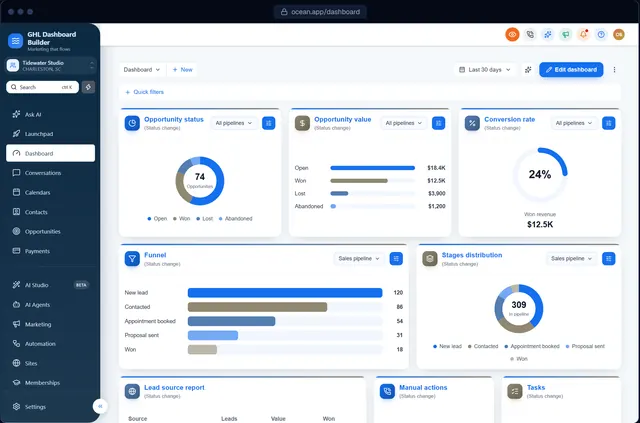
GHL dashboard customization
GHL dashboard customization, without writing code
Change how HighLevel looks for your agency and your clients: colors, fonts, the sidebar and menu, the Dashboard itself, the login page and the language. Design it visually, then install it with two lines.
How do you customize the GHL dashboard?
HighLevel's own settings change your logo, favicon and domain. Everything else (colors, fonts, sidebar, menu wording, the Dashboard's look, the login page) is changed with custom CSS and JavaScript in the agency's Custom Code settings. GHL Dashboard Builder writes that code for you from a visual design, so you customize the GHL dashboard without coding.
Last updated
What you can change
Everything on the GHL dashboard you can customize
Colors and fonts
A full color system (primary, accent, sidebar, header, surfaces and status colors), your fonts and favicon.
Sidebar and header
HighLevel's own sidebar in your colors, colored or 3D menu icons, hover menus with every page, or a top bar instead.
Menu wording
Rename, reorder and hide any of the 19 menu items, so a clinic sees Patients and a roofer sees Jobs.
Welcome banner
A greeting with the user's first name, the date, a clock and quick links at the top of the Dashboard.
Live dashboard figures
Today's appointments, unread conversations, tasks due, new opportunities and overdue invoices, from HighLevel itself.
Pipeline board
Branded stage headers and opportunity cards on HighLevel's opportunities board.
Login page
12 login designs in your colors, on your white-label sign-in page (Pro and Agency).
Language
15 languages, including Arabic, Urdu and Hebrew with right-to-left layout (Pro and Agency).
How it works
GHL dashboard customization in three steps
No developer, and nothing changes in HighLevel until you paste the two lines.
- 1
Design it in the builder
Pick one of 27 templates, then change colors, menu, banner and login until it's yours. Free, no sign-up, on a live copy of HighLevel's screens.
- 2
Get two install lines
Choose a plan and you get one CSS line and one JavaScript line (or we install them for you on Pro and Agency).
- 3
Paste them into HighLevel
Settings → Company → Whitelabel → Custom Code: CSS in Custom CSS, JavaScript in Custom JavaScript. Save, refresh, done.
Compare
Three ways to customize a GHL dashboard
| Question | Write custom CSS yourself | Hire a freelancer | GHL Dashboard Builder |
|---|---|---|---|
| Coding needed | Yes: CSS and some JavaScript | No | No |
| See it before it's live | Only by installing it | Usually screenshots | Live preview on desktop, tablet and phone |
| Menu renames, live counts, pop-ups | Hand-written JavaScript | Depends on the freelancer | Built in |
| One sub-account only | Your own script | Depends on the freelancer | Built in |
| When HighLevel changes its layout | You fix it | Pay for another job | 12 months of updates (lifetime on Agency) |
| Price | Your time | Per job | From $180, paid once |
Which plan? Every plan includes the templates, colors, fonts, sidebar, header, welcome banner, live figures and privacy mode. Menu renames, the login page and languages start at Pro; your own custom CSS and JavaScript on top is part of Agency.
See plansFAQ
GHL dashboard customization: questions agencies ask
Can you customize the GoHighLevel dashboard?
Yes. HighLevel's agency settings let you add custom CSS and custom JavaScript, which apply across the HighLevel interface your users see. That's how colors, fonts, the sidebar, menu wording, the Dashboard and the login page are changed. GHL Dashboard Builder writes that code from a visual design.
What can't be customized on the GHL dashboard?
The data and the features stay HighLevel's: custom code changes how HighLevel looks and what its menu says, not what it does. Text inside HighLevel's own pages also follows HighLevel's language settings rather than the theme.
Do I need to code to customize my GHL dashboard?
No. You design it visually in the builder and receive two ready-made lines to paste, or choose Pro or Agency and we install it for you.
Will customizing the dashboard affect my sub-accounts?
Agency-level custom code applies to the sub-account views too, so every client sees the new look. You can also limit a design to the sub-accounts you choose; the others stay plain HighLevel.
Can I undo a GHL dashboard customization?
Yes. Clear the two Custom Code boxes in HighLevel and the dashboard goes back to standard at once. Nothing in your data changes either way.
How long does GHL dashboard customization take?
Designing from a template takes minutes in the builder, and installing takes about five minutes. Agency includes a look designed from scratch by our team.
Customize your GHL dashboard today
Try it free in the builder, no sign-up. When you're happy, pay once and install it in two lines.