

GoHighLevel theme builder
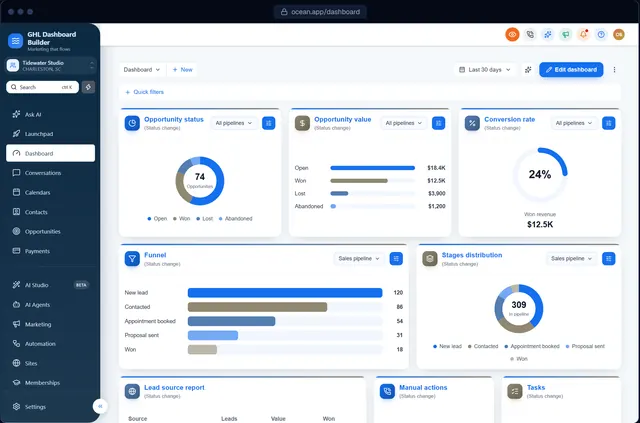
A GoHighLevel theme builder that shows you the real dashboard
Start from one of 27 GHL themes, then make it yours: colors, fonts, menu, banner, login page and effects. Every change shows on a live copy of HighLevel's screens before anything reaches your account.
What is a GoHighLevel theme builder?
A GoHighLevel theme builder is a visual editor that creates the custom CSS and JavaScript HighLevel uses to restyle an agency's dashboard. GHL Dashboard Builder starts from 27 ready-made themes, previews every change on HighLevel's real screens, and gives you two lines to paste into HighLevel's Custom Code settings.
Last updated
What you can change
What the theme builder lets you change
27 starting themes
Modern, dark, minimal, luxury and industry themes for dentists, roofers, detailers, gyms, law firms and more.
Your brand colors
Primary, accent, sidebar, header and surface colors, with matching hover and active states.
Fonts
Heading and body fonts, plus script fonts for Arabic, Hebrew and Urdu.
Sidebar style
Solid, gradient or glass sidebars, colored or 3D icons, hover menus and an optional top bar.
Buttons and effects
Gradient, outline or glass buttons, corners, borders, glow and a subtle shimmer while pages load.
Live preview
Desktop, tablet and phone, every module of HighLevel, before the theme is installed.
How it works
GoHighLevel theme builder in three steps
No developer, and nothing changes in HighLevel until you paste the two lines.
- 1
Design it in the builder
Choose a theme, then change colors, fonts and effects until it matches your brand. Free, no sign-up, on a live copy of HighLevel's screens.
- 2
Get two install lines
Choose a plan and you get one CSS line and one JavaScript line (or we install them for you on Pro and Agency).
- 3
Paste them into HighLevel
Settings → Company → Whitelabel → Custom Code: CSS in Custom CSS, JavaScript in Custom JavaScript. Save, refresh, done.
Compare
Copy-paste themes vs a theme builder
| Question | Free CSS theme snippets | Hand-made theme | GHL Dashboard Builder |
|---|---|---|---|
| Your exact brand colors | Edit the code yourself | Yes | Yes, with a color picker |
| Preview before installing | No | Usually screenshots | Live, on HighLevel's screens |
| Menu, banner and login page | Rarely included | Extra work | Included in the same theme |
| Kept working after HighLevel updates | Up to you | Up to the developer | 12 months of updates (lifetime on Agency) |
| Change it later | Edit the code again | Another job | Edit, then Deploy to live |
Which plan? All plans include every theme. Starter is one design; Pro adds up to 3 designs and every editor option; Agency up to 100 designs and a theme designed from scratch by our team.
See plansFAQ
GoHighLevel theme builder: questions agencies ask
Are there ready-made GoHighLevel themes?
Yes. The builder includes 27 themes, from clean and dark looks to industry themes for dental clinics, real estate, roofers and HVAC, auto detailers, gyms, law firms and pet groomers. Each one is a starting point you can recolor.
How do I install a GoHighLevel theme?
Paste the CSS line into Custom CSS and the JavaScript line into Custom JavaScript in your agency's Custom Code settings, save and refresh. To change the theme later, edit it and press Deploy to live; HighLevel picks up the new version.
Can each client have a different GHL theme?
Pro includes up to 3 designs and Agency up to 100, and each design can be limited to the sub-accounts you choose, so key clients can each have their own theme from one install.
Do GHL themes break when HighLevel updates?
HighLevel doesn't officially support custom code, so a big HighLevel update can occasionally need a theme refresh. Every plan includes 12 months of updates that cover this, and Agency includes them for life.
Is there a free GoHighLevel theme builder?
The builder itself is free to use with no sign-up, including every theme and the live preview. A plan is needed to get the install code.
Build your GoHighLevel theme
Try it free in the builder, no sign-up. When you're happy, pay once and install it in two lines.