

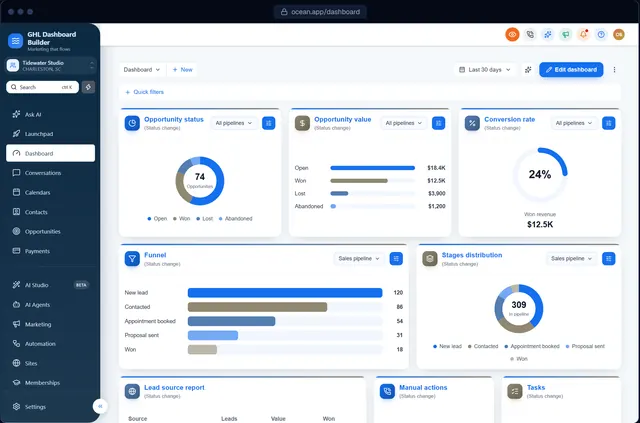
GHL sidebar & menu
GHL sidebar and menu customization: your words, your order
Rename HighLevel's menu items to your clients' language, put the ones they use first, hide the rest, and style the sidebar in your colors, with live counts and hover menus.
Can you rename the menu in GoHighLevel?
HighLevel's settings don't rename its sidebar menu, but custom JavaScript in the agency's Custom Code can. GHL Dashboard Builder's menu editor renames, reorders and hides any of HighLevel's 19 menu items, adds your own items, and installs with the rest of your theme from the Pro plan.
Last updated
What you can change
What you can do with the GHL sidebar and menu
Rename items
Contacts becomes Patients, Opportunities becomes Jobs: any wording, in any of 15 languages.
Reorder and hide
Put the items clients use first and hide the ones they never need.
Labels and counts
New and Beta labels, and live counts: unread conversations, appointments today, tasks due.
Favourites
A star in the header pins any page to the top of the menu, for each user.
Sidebar style
Colors, icon styles, hover menus with every page, dividers, or a top navigation bar.
Your own items
Add menu items for your custom objects, such as Vehicles, in the position you choose.
How it works
GHL sidebar menu customization in three steps
No developer, and nothing changes in HighLevel until you paste the two lines.
- 1
Design it in the builder
Open the Menu section, rename and drag items, and preview the sidebar on every screen. Free, no sign-up, on a live copy of HighLevel's screens.
- 2
Get two install lines
Choose a plan and you get one CSS line and one JavaScript line (or we install them for you on Pro and Agency).
- 3
Paste them into HighLevel
Settings → Company → Whitelabel → Custom Code: CSS in Custom CSS, JavaScript in Custom JavaScript. Save, refresh, done.
Compare
Ways to change the GHL sidebar menu
| Question | HighLevel settings | Custom JavaScript by hand | GHL Dashboard Builder |
|---|---|---|---|
| Rename menu items | No | Yes, with code | Yes, in the menu editor |
| Reorder and hide items | Some items, by permissions | Yes, with code | Yes, drag and toggle |
| Live counts on the menu | No | Yes, with more code | Built in |
| Survives HighLevel re-rendering the menu | n/a | Only if you handle it | Handled |
| Settings menu left untouched | n/a | Only if you handle it | Yes |
Which plan? The menu editor (renames, order, hiding, favourites and live menu counts) is part of Pro and Agency. Starter styles the sidebar and header in your colors.
See plansFAQ
GHL sidebar menu customization: questions agencies ask
How do I rename menu items in GoHighLevel?
HighLevel doesn't offer it in its settings, so it's done with custom JavaScript in the agency's Custom Code. In the builder's menu editor you type the new names; the code that applies them is generated for you.
Can I hide GoHighLevel menu items from clients?
Yes. Hidden items are removed from the sidebar for everyone who sees the design. For true access control, also use HighLevel's user permissions, since hiding is visual.
Can I change the order of the GHL sidebar?
Yes. Drag items into the order you want; HighLevel's own markup isn't moved, so its menu keeps working normally.
Will renamed menu items show in other languages?
Yes. Your names apply in the language you choose, and the menu can be in any of 15 languages, including right-to-left Arabic, Urdu and Hebrew.
Can I add a custom object like Vehicles to the menu?
Yes. Custom menu items appear for HighLevel custom objects, placed after the item you choose.
Rename your GHL menu for your clients
Try it free in the builder, no sign-up. When you're happy, pay once and install it in two lines.