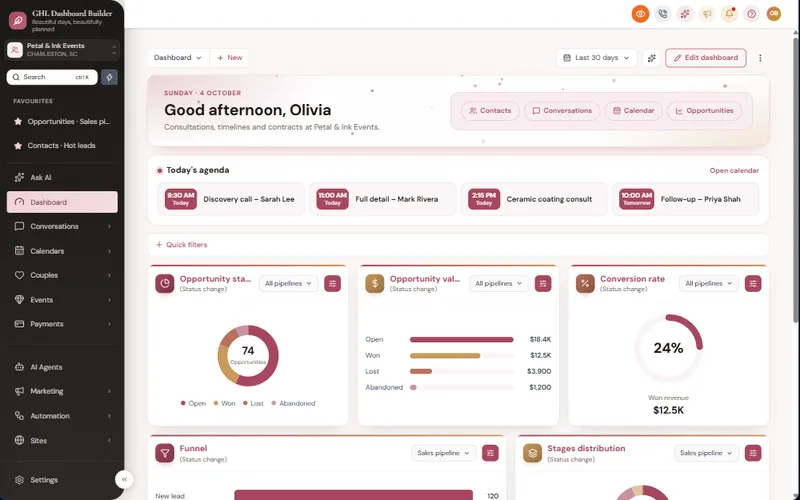
Ink and blush with an elegant serif for wedding planners, photographers and event studios, with an appointments board for consultations and pinned favourites.
Included:Welcome bannerAppointments boardFavouritesPrivacy modeHover menusRenamed menu
About the Bloom HighLevel template
Ink and blush with an elegant serif for wedding planners, photographers and event studios, with an appointments board for consultations and pinned favourites.
Premium template: Hover any menu item to see all its pages, plus a dashboard welcome banner with greeting, clock and quick links.
Layout
Sidebar
Mood
Dark sidebar
Navigation
Ink sidebar with blush highlights; Contacts renamed Couples and Opportunities renamed Events, with favourites
Login page
Editorial layout over a prism scene
Style
Elegant, Romantic
Right-to-left
Yes — Arabic, Hebrew and Urdu menus mirror correctly
Palette
#B5546A#1C1917#FBF7F6#D9A7B0
Best for
wedding, photography, events, elegant, serif
What Bloom installs in HighLevel
✓Welcome banner
✓Appointments board
✓Favourites
✓Privacy mode
✓Hover menus
✓Renamed menu
How to use Bloom
Click through the live preview above — switch between desktop, tablet and phone, or change the language.
Open it in the builder and swap in your logo, colours, fonts, menu names and login page. No sign-up needed.
Pick a plan to get your install code, then paste it into HighLevel's Custom Code settings. Every sub-account picks up the new look.