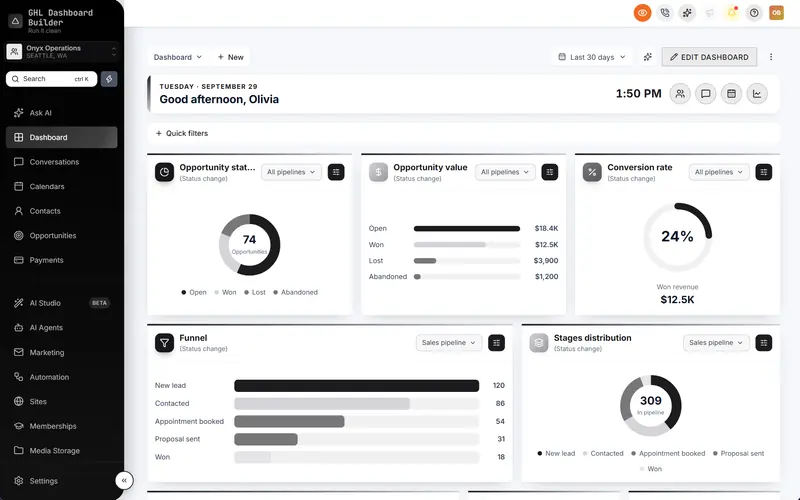
Included:Welcome bannerPrivacy modeHover menus
About the Obsidian HighLevel template
Pure black sidebar, graphite accents and monospaced headings for operators who want nothing extra.
Premium template: Hover any menu item to see all its pages, plus a dashboard welcome banner with greeting, clock and quick links.
- Layout
- Sidebar
- Mood
- Dark sidebar
- Navigation
- Native HighLevel menu on a pure-black sidebar with graphite active items
- Login page
- Minimal form under a spotlight
- Style
- Monochrome, Sharp
- Right-to-left
- Yes — Arabic, Hebrew and Urdu menus mirror correctly
- Palette
- #000000#141416#8E8E93#FFFFFF
- Best for
- dark, monochrome, sharp, compact
What Obsidian installs in HighLevel
- ✓Welcome banner
- ✓Privacy mode
- ✓Hover menus
How to use Obsidian
- Click through the live preview above — switch between desktop, tablet and phone, or change the language.
- Open it in the builder and swap in your logo, colours, fonts, menu names and login page. No sign-up needed.
- Pick a plan to get your install code, then paste it into HighLevel's Custom Code settings. Every sub-account picks up the new look.
Guides
More HighLevel templates
- MidnightDeep indigo sidebar with violet highlights, for agencies that do their best work after dark.
- EmberDeep charcoal with flame coral and amber: a warm, dark HighLevel with live figures in a spotlight banner, live menu counts and pop-ups for every new notification.
- NovaA near-black HighLevel sidebar with electric lime highlights, for teams that like a technical edge.
- OceanHighLevel, refined: the native sidebar in a deep-navy gradient, crisp Inter type and a clear ocean-blue primary.
- NoorHighLevel fully in Arabic and right to left: menu, screens, welcome banner and live figures, on a deep-emerald menu with gold accents.
- Noor LTRHighLevel fully in Arabic with the familiar left-to-right layout: same emerald-and-gold look, for teams who want Arabic without flipping the screen.
See all 29 templates →
We use Google Analytics cookies to understand how visitors use this site, only if you allow it. Privacy policy