Included:Privacy modeTop navigationRenamed menu
About the Executive HighLevel template
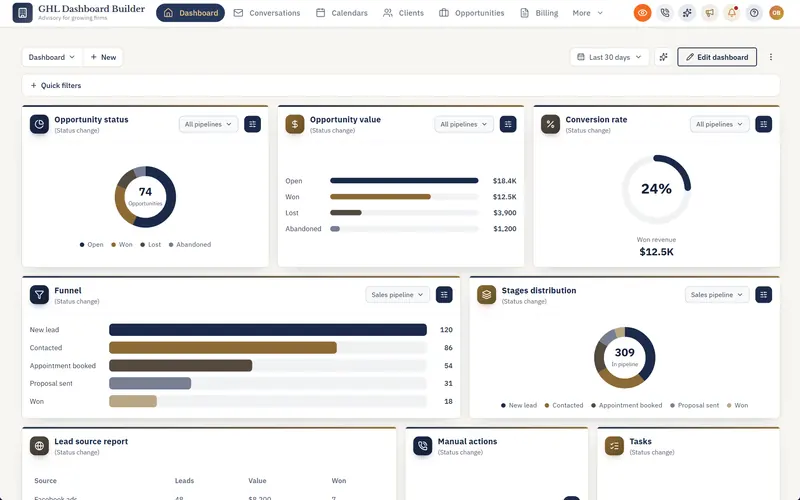
Navy and muted gold with serif headings: a composed, boardroom take on HighLevel with top navigation.
Top bar template: The menu moves into a full-width top bar with a More menu and a Settings mega menu, so pages get the whole screen.
- Layout
- Top navigation
- Mood
- Dark sidebar
- Navigation
- HighLevel's menu in a navy top bar with gold accents; Settings opens a mega menu
- Login page
- Editorial split with a team photo
- Style
- Editorial, Refined
- Right-to-left
- Yes — Arabic, Hebrew and Urdu menus mirror correctly
- Palette
- #1B2A4A#B08D57#F7F6F2#FFFFFF
- Best for
- corporate, serif, navy, professional
What Executive installs in HighLevel
- ✓Privacy mode
- ✓Top navigation
- ✓Renamed menu
How to use Executive
- Click through the live preview above — switch between desktop, tablet and phone, or change the language.
- Open it in the builder and swap in your logo, colours, fonts, menu names and login page. No sign-up needed.
- Pick a plan to get your install code, then paste it into HighLevel's Custom Code settings. Every sub-account picks up the new look.
Popular with agencies in
Guides
More HighLevel templates
- AtlasHighLevel blue with a warm sand accent on a slate sidebar, organised and familiar.
- HarborSteel teal and sea green with top navigation for insurance, mortgage and finance teams, with solid-bar privacy mode for client calls and pinned favourites.
- ObsidianPure black sidebar, graphite accents and monospaced headings for operators who want nothing extra.
- OceanHighLevel, refined: the native sidebar in a deep-navy gradient, crisp Inter type and a clear ocean-blue primary.
- NoorHighLevel fully in Arabic and right to left: menu, screens, welcome banner and live figures, on a deep-emerald menu with gold accents.
- Noor LTRHighLevel fully in Arabic with the familiar left-to-right layout: same emerald-and-gold look, for teams who want Arabic without flipping the screen.
See all 29 templates →
We use Google Analytics cookies to understand how visitors use this site, only if you allow it. Privacy policy