

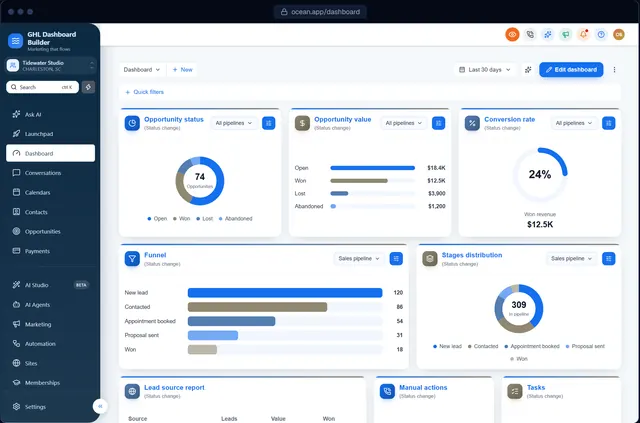
A dental practice in Leeds logs in to the platform you sold them. The menu says Opportunities where they say Enquiries, the welcome email talks about “color”, next Tuesday’s appointment shows as 10/12 because the sub-account was copied from a client in Texas, and the invoice has no VAT line. Nothing is broken, yet the software feels American and rented, not like the system their agency built for them.
This guide is for anyone running a GoHighLevel white label agency in the UK, or serving British clients from abroad. It covers what is specific to this market in HighLevel (also called GoHighLevel or GHL): British wording and spelling, pounds and dates, the clock changes, VAT, UK GDPR and PECR, SMS and phone numbers, the industries that buy, and a step-by-step setup. GHL Dashboard Builder is an independent design service and is not affiliated with HighLevel; where our product helps, we say exactly what it does, and where it stops.
What is different about a GoHighLevel white label agency in the UK?
The technical route is the same as anywhere: HighLevel’s built-in white-label settings for your identity, sub-account settings for each client, then a theme in custom code for the look and the menu. What changes in the UK is the wording clients expect, the date and time conventions, VAT on invoices, and a mature, actively enforced set of privacy and marketing rules.
If you have not set up the identity layer yet, start with our guide on how to white-label HighLevel. It covers the logo, custom domain and legal links under Settings, Company, Whitelabel, and explains why those settings do not change colors, menu wording or language. Everything below assumes that layer is done.
The table compares a default HighLevel sub-account with what a typical UK client expects.
| Area | Default HighLevel | What UK clients usually expect |
|---|---|---|
| Wording and spelling | American English, for example color | British English and their own trade words (Enquiries, Customers, Bookings) |
| Currency | Depends on the business country unless set | Pounds sterling (GBP), written £ |
| Dates | Depends on browser and settings | Day before month: 12/10/2026 |
| Time | Often a 12-hour clock in US setups | 24-hour on screen (14:30), 12-hour in speech |
| Time zone | Whatever the account was created with | Europe/London, with clocks changing twice a year |
| Week | Often starts on Sunday in US setups | Starts on Monday |
| Tax on invoices | No tax unless you add one | 20% VAT for VAT-registered businesses |
| Marketing consent | Not checked by HighLevel | UK GDPR and PECR, enforced by the ICO |
| Public holidays | None blocked | Bank holidays that differ between the four nations |
Two kinds of UK agency
There are two common HighLevel agency models in the UK, and this guide serves both. The first sells HighLevel to UK businesses: clinics, trades, salons, gyms, estate agents, solicitors and accountants. For them, British wording, VAT, local phone numbers and PECR-compliant follow-ups matter most.
The second is a UK agency, or an agency elsewhere, that runs accounts for clients in several countries, for example the UK and the US. For that model the risk is copying one setup everywhere. A sub-account built for an American client carries American dates, a US time zone and US tax assumptions into a British business. Treat each client’s sub-account as its own market and set it up deliberately.
How does GHL Dashboard Builder handle a UK setup?
GHL Dashboard Builder restyles HighLevel’s interface with your colors and fonts, lets you rename every menu item in British English, limits a design to the clients who need it, adds a privacy mode for demos, and installs as one CSS line and one JavaScript line. It does not change HighLevel’s own currency, tax or time-zone settings.
GHL Dashboard Builder is an independent design service that turns the standard HighLevel (GoHighLevel) dashboard into a branded platform: your colors, menu, login design, privacy mode and your clients’ language, installed with two lines of code. For a UK agency the language is English, so the value is not translation. It is a dashboard that looks like your own product and speaks your client’s words, in British spelling. Everything below comes from our features page.
What the UK setup includes
- Brand, colors and fonts. Your color system, fonts and favicon across HighLevel’s sidebar, header, cards and buttons.
- Menu editor. Rename, reorder and hide any of HighLevel’s 19 menu items, add New and Beta labels and your own custom items, so a practice sees Patients and an estate agent sees Instructions.
- Templates. 27 templates, including the three we suggest for UK service firms on our United Kingdom page: Executive, Counsel and Monarch.
- Welcome banner. A greeting with the user’s first name, the date, a clock and quick links on the Dashboard, in six designs and five layouts.
- Single sub-account. Limit a design to chosen sub-accounts, by link or Location ID, while the rest keep their current look.
- Privacy mode. An eye button in HighLevel’s header that blurs contact names, emails, phone numbers, the conversation list and deal values.
- Login page design. 12 login designs in your colors for your white-label sign-in page, from Pro.
- No data access. The builder never connects to your HighLevel account, and the installed code does not send data anywhere.
At a glance: features, what they do, which plan
| Feature | What it does for your UK clients | Plan |
|---|---|---|
| Brand, colors and fonts | Your brand across the dashboard instead of HighLevel’s default look | All plans |
| Menu editor | British wording for the 19 menu items: Enquiries, Customers, Bookings | Pro and Agency |
| Templates | Executive, Counsel and Monarch as starting points, among 27 templates | All plans |
| Welcome banner | A greeting, date, clock and quick links on the Dashboard | All plans |
| Single sub-account | The British design only for chosen sub-accounts, by link or Location ID | All plans |
| Privacy mode | Blurs names, emails, phone numbers and deal values during screen shares | All plans |
| Login page design | 12 login designs in your colors for your white-label sign-in page | Pro and Agency |
| Two-line install | One CSS line and one JavaScript line; later changes go live with Deploy to live | All plans (we install it on Pro and Agency) |
What it costs
All three plans are one-time payments with no monthly fee, billed in US dollars. Starter ($180) gives you one branded design from any of the 27 templates. Pro ($280) adds up to 3 designs, every editor option including the menu editor, the branded login page, 15 languages and installation by us. Agency ($880) adds up to 100 designs, a look designed by our team, custom code and lifetime updates. Starter and Pro include 12 months of updates, then optional at $99 a year. Current details are on the pricing page.
The menu editor for British wording is included from Pro. Source: GHL Dashboard Builder pricing, October 2026. All three plans are one-time payments in US dollars with no monthly fee.
We do not convert these prices into pounds here, because the exchange rate moves and any figure would be out of date quickly. Your card issuer or bank sets the rate on the day you pay.
What the client sees afterwards
After installation, a user in a UK sub-account logs in on your white-label domain and sees the sidebar in your colors, with labels such as Enquiries, Customers, Bookings and Invoices, and a welcome banner with their first name. When they open a deep settings page or a builder, they see HighLevel’s own text, in HighLevel’s wording. A user in a US sub-account of the same agency can keep the original wording, because the design is limited to the sub-accounts you chose.
Should a UK client’s dashboard use British English wording?
Yes, for the menu your client’s team reads every day. HighLevel’s own screens use American wording and spelling, which UK staff understand but notice. Renaming the sidebar items to the client’s own words, in British spelling, is the cheapest way to make the platform feel built for them. Inner pages stay as HighLevel writes them.
British and American English differ in three ways that matter in a CRM. Spelling: enquiry, colour, organise, cancelled. Vocabulary: a UK practice books appointments and sends reminders, an estate agent takes instructions and arranges viewings, a tradesperson sends quotes and invoices. And tone: UK business software tends to be plain and understated, so labels like “Crush your pipeline” read as American sales talk.
Words worth changing
The table shows renames we see agencies make for UK clients. They are suggestions, not rules; the right word is the one your client already uses in their diary, spreadsheet or till system.
| HighLevel item | Clinic or practice | Estate or letting agent | Trades and home services | Professional services |
|---|---|---|---|---|
| Contacts | Patients | Applicants and vendors | Customers | Clients |
| Opportunities | Treatment plans | Instructions | Jobs | Matters or Enquiries |
| Calendars | Appointments | Viewings | Bookings | Meetings |
| Conversations | Messages | Messages | Messages | Correspondence |
| Payments | Invoices | Fees | Invoices | Billing |
What HighLevel offers natively
HighLevel has started translating its interface into other languages. HighLevel’s help center article on internationalization explains that a sub-account’s default language is set under Settings, Business Profile, Platform Language, and each user can override it under Settings, My Profile. That setting chooses a language, not a regional spelling, so British wording in the menu comes from a theme, not from a HighLevel setting. Check the current list in your own account, because HighLevel ships changes often.
What a theme changes, and what stays
A theme can rename each sidebar item, reorder the menu so the items a client uses most come first, and hide what they never use. If you want to understand the mechanics of what custom CSS and JavaScript can and cannot reach, our guide to HighLevel custom CSS explains selectors, updates and safe practice. A theme cannot rewrite text inside HighLevel’s own pages, builders, system emails or the mobile app. So the honest promise to a UK client is: “The menu your team uses every day is in your words. Some inner settings pages keep HighLevel’s American wording.” Say it before the sale.
How should pounds, dates and times appear for UK clients?
Set each UK sub-account to GBP and the Europe/London time zone, write dates day before month, and expect the 24-hour clock on screen. Most UK problems come from settings copied from an American client, so the work is checking each sub-account rather than designing anything new.
What browsers do by default
Browsers format numbers and dates using the Unicode Common Locale Data Repository (CLDR). We formatted the same amount and date in Node.js 22 with ICU 77.1, which ships CLDR version 47. Browsers use the same data, though versions vary.
| Locale | £1,250,000.50 | Short date for 12 October 2026 | Long date | Time | Week starts |
|---|---|---|---|---|---|
| en-GB (English, United Kingdom) | £1,250,000.50 | 12/10/2026 | 12 October 2026 | 14:30 | Monday |
| en-US (a copied US setup) | £1,250,000.50 | 10/12/26 | October 12, 2026 | 2:30 PM | Sunday |
Four practical points follow from this table.
- A copied US setup writes the month first. In en-US, 12 October becomes 10/12/26, which a British receptionist reads as 10 December. If a user or sub-account was created with US settings, change it, or write the month as a word in templates: “Tuesday 14 October at 16:30”.
- The 24-hour clock is normal on screen. The en-GB locale shows 14:30, while people often say “half past two”. In customer-facing messages either form works; be consistent within one client.
- The week starts on Monday. Calendar views, weekly reports and “this week” filters should start on Monday for UK teams, or the numbers will not match what the client counts.
- The pound sign goes before the amount. Write £1,250.00, never 1,250.00 GBP in customer-facing text.
Setting GBP in HighLevel
According to HighLevel’s changelog on default currency, a sub-account’s default currency can be set under Settings, Business Profile; if none is set, HighLevel uses the currency of the business’s country. Products keep the currency they were created in, so set GBP before you build a UK client’s products, invoices and payment links, not afterwards.
Clock changes and the time zone
The UK moves between Greenwich Mean Time and British Summer Time twice a year. GOV.UK’s clock change page shows that the clocks go forward one hour at 1am on the last Sunday in March and back one hour at 2am on the last Sunday in October; in 2026 the dates are 29 March and 25 October. Set each UK sub-account to the Europe/London time zone in Settings, Business Profile, as HighLevel’s business profile article describes, rather than a fixed GMT offset, so appointments and workflow send times follow the change automatically.
Bank holidays differ by nation
England and Wales, Scotland and Northern Ireland do not share the same bank holidays. Scotland has 2 January and St Andrew’s Day, and Northern Ireland has St Patrick’s Day and the Battle of the Boyne holiday, as GOV.UK’s bank holidays page lists. For a client in Glasgow or Belfast, block the right days in calendars and pause promotional sends on them; do not copy an English client’s calendar.
- Calendars. Set booking hours per calendar with the client’s real hours, and add bank holidays for their nation as blocked days.
- Workflows. Where a workflow waits for business hours, set the window to the client’s days and the Europe/London time zone.
- Reports. Check that weekly reports start on Monday and that month-end matches the client’s accounting.
Our builder previews pounds and UK date formats when you design for this market. Inside HighLevel, amounts, dates and time zones follow each sub-account’s own settings, which is why the steps above matter.
How do you handle VAT and payments for UK clients in HighLevel?
Add a 20% VAT tax rate in HighLevel’s payment settings for clients that are VAT-registered, decide whether prices include or exclude VAT, and set GBP before you create products. Stripe is available to UK businesses, so card payments are usually straightforward. Your own HighLevel bill stays in US dollars.
VAT basics for a CRM setup
The standard rate of VAT in the UK is 20%, according to GOV.UK’s VAT rates page. A business must register once its taxable turnover passes £90,000 in a rolling 12-month period, or if it expects to pass that in the next 30 days alone, as GOV.UK’s guidance on when to register explains. Many of your clients will be below that threshold and not registered, so ask before you add VAT to anything. A business that is not registered must not charge VAT.
Adding VAT in HighLevel
HighLevel’s help article on taxes describes creating tax rates and applying them to invoices. In practice:
- In the client’s sub-account, go to Payments, Settings, Taxes.
- Create a tax named VAT at 20%, and add the client’s VAT registration number in the tax ID field if the form offers it.
- Choose whether prices are tax-inclusive or tax-exclusive. Consumer-facing businesses usually quote prices including VAT; business-to-business firms often quote excluding VAT. HighLevel’s article on tax-inclusive or exclusive pricing explains the setting.
- Add the tax to products, or to each invoice line with Add Tax under Payments, Invoices.
- Send a test invoice to yourself and check the VAT line, the total and the client’s business details.
HighLevel also offers automatic tax calculation, but at the time of writing guides describe it as working from a US state and postal code on the contact, so for UK clients a fixed 20% tax rate is the simpler and more predictable option. Some goods and services use the reduced 5% or zero rate; for anything other than a plain service business, ask the client’s accountant which rate applies to each product.
Card payments and your own costs
Stripe is available to businesses in the United Kingdom, according to Stripe’s global availability page, and Stripe is the payment provider most HighLevel features are built around. That makes UK checkout simpler than in many markets: connect the client’s own Stripe account under Payments, Integrations, set GBP, and test a payment link.
Your agency’s own HighLevel bill is in US dollars. HighLevel lists its main plans at $97, $297 and $497 a month at the time of writing on HighLevel’s pricing page. A UK agency charging clients in pounds carries the exchange-rate risk, so review your retainer prices at a fixed point each year rather than absorbing every move.
| Payment question | UK answer | What to set in HighLevel |
|---|---|---|
| Which currency? | Pounds sterling (GBP) | Default currency in Settings, Business Profile, before products |
| Add VAT? | Only if the client is VAT-registered | A 20% VAT tax rate in Payments, Settings, Taxes |
| Inclusive or exclusive? | Consumers: usually inclusive; businesses: often exclusive | The tax-inclusive or tax-exclusive setting |
| Card payments? | Stripe is available to UK businesses | Connect the client’s Stripe account under Payments, Integrations |
| Bank transfers? | Common for business clients | Bank details on the invoice; mark paid when received |
| Your own HighLevel bill | Charged in US dollars | Nothing; price your retainers with the exchange rate in mind |
What do UK GDPR and PECR mean for your HighLevel setup?
UK GDPR governs how you and your clients handle personal data, and PECR adds rules for marketing emails, texts and calls. Both are enforced by the Information Commissioner’s Office (ICO). For a HighLevel agency, that means consent before marketing, a data processing agreement with each client, a lawful route for data stored in the US, and care with what you show on screen. This section is an overview, not legal advice.
Roles: who is responsible for what
In most HighLevel setups, your client is the controller: they decide why contact data is collected and what is done with it. Your agency is usually a processor acting on their instructions, and HighLevel is a sub-processor. Put a data processing agreement in your client contract, list HighLevel among your sub-processors, and give each user only the role their job needs.
HighLevel is a US company, so client data stored in HighLevel is usually a restricted transfer under UK GDPR. Since 12 October 2023, UK organisations can transfer data to US businesses certified under the UK Extension to the EU-US Data Privacy Framework, but only if the business has an active certification, as the ICO’s guidance on the UK Extension explains. Check HighLevel’s current data processing terms and its status on the Data Privacy Framework list before you tell a client how their data is transferred.
Marketing rules: consent or soft opt-in
PECR covers marketing by email, text, in-app messages and direct messages, not service messages. The ICO’s guidance on electronic mail marketing says marketing emails and texts to individuals need prior consent or a valid soft opt-in. The soft opt-in applies only when the sender collected the details itself, during a sale or negotiation, for similar products, with a chance to opt out at the time and in every message. Pre-ticked boxes do not count as consent.
For a HighLevel setup, that becomes four habits:
- Record consent. Every form that collects an email or mobile number for marketing needs an unticked consent box, and every imported list needs a known source.
- Keep opt-out working. Leave unsubscribe links and STOP handling on, and honour opt-outs in every workflow.
- Separate reminders from promotions. Appointment confirmations and payment reminders are service messages; offers and newsletters are marketing. Build them as separate workflows with separate lists.
- Do not share lists between clients. The soft opt-in does not travel; a list one client collected is not a list another client can market to.
The penalties went up in 2026
The Data (Use and Access) Act 2025 raised the maximum PECR fine from £500,000 to the higher of £17.5 million or 4% of global annual turnover, matching UK GDPR, and the main reforms took effect on 5 February 2026, according to Capsticks’ summary of the Act and Bratby Law’s commentary on its commencement. The headline numbers are maximums, not typical fines, but a PECR breach is no longer a small risk for a client sending bulk SMS from HighLevel.
The data protection fee
Most organisations that process personal data must pay the ICO an annual data protection fee unless they are exempt. The ICO’s data protection fee page sets three tiers based on size and turnover. Your agency probably needs to pay, and so do most of your clients.
A £5 discount applies when paying by direct debit. Source: ICO data protection fee, tiers in force since 17 February 2025. Tier 1: turnover under £632,000 or no more than 10 staff. Tier 2: turnover up to £36 million or no more than 250 staff. Tier 3: everyone else.
Screen shares are where data leaks
UK agencies run many video calls: sales demos to new prospects, support sessions, onboarding and recorded training. Each one can show real names, mobile numbers and deal values to people who have no reason to see them, and a recording kept in a shared drive extends that exposure for years. Our guide to hiding client data in GoHighLevel during demos explains the options in detail; the short version is to blur client data before you share, every time.
| Good practice | Where it shows up in HighLevel | What to do |
|---|---|---|
| Consent before marketing | Forms, surveys, chat widgets, imports | Unticked consent box, privacy link, and the source of every list recorded |
| Easy opt-out | Email, SMS and WhatsApp campaigns | Keep unsubscribe links and STOP handling on |
| Data processing agreement | Your contract with each client | List HighLevel and other tools as sub-processors |
| International transfers | Data stored by HighLevel in the US | Check HighLevel’s DPA and transfer mechanism |
| Access only as needed | Users and roles | Give each user the role their job needs, not admin |
| Security of what you show | Demos, screen shares, training videos | Blur names, numbers and deal values before you share |
What are the rules for UK phone numbers and SMS in HighLevel?
Buying a UK number in HighLevel’s phone system needs a regulatory bundle with the business’s identity and address. UK marketing texts follow PECR consent rules. Plain English texts fit 160 characters in one segment, but one curly apostrophe or emoji cuts that to 70 and raises the cost.
Regulatory bundles for UK numbers
HighLevel’s help article on regulatory bundles explains that most countries outside the US and Canada require a regulatory bundle or address before you can buy a number, and that bundles are managed in each sub-account’s Compliance tab. Fields can be pre-filled from the sub-account’s business profile, so fill that in accurately first. Start the bundle early: approval is not instant, and a client launch should not wait on it.
Why a £ sign is fine but a curly apostrophe is not
SMS uses a compact alphabet called GSM-7 when every character fits it, and a message then carries 160 characters in one segment, or 153 per segment when it is split, as Twilio’s GSM-7 guide explains. The pound sign is part of that basic alphabet, which suits UK clients. A single character outside it, such as a curly apostrophe pasted from a document or an emoji, switches the whole message to UCS-2, which fits 70 characters in one segment and 67 per segment, according to Twilio’s UCS-2 guide. Each segment is billed.
The £ sign is in the GSM-7 alphabet; a curly apostrophe or an emoji forces UCS-2. Source: Twilio: What is GSM-7 character encoding? and What is UCS-2 character encoding? (GSM-7: 160 in one segment, 153 per segment when split; UCS-2: 70 in one segment, 67 per segment when split).
The practical fix is simple: write SMS templates in HighLevel directly, or paste them as plain text, and replace curly quotes with straight ones. A 140-character appointment reminder with a curly apostrophe costs three segments instead of one.
Sender names and reminders
Many UK businesses send texts with an alphanumeric sender name, such as the practice name, instead of a number. Ask your SMS provider how sender names are handled for UK traffic and whether replies are possible, because a reminder that asks the patient to reply YES needs a number that can receive the reply. Keep reminders short: the day, the time, the place and one instruction.
Which industries and templates fit UK clients?
UK HighLevel agencies mostly serve small service businesses: clinics, trades, salons, gyms, estate agents and professional firms. The three templates we suggest for this market on our United Kingdom page are Executive, Counsel and Monarch, chosen for the restrained, professional look UK service firms tend to prefer.
The UK market is overwhelmingly made up of small businesses. The Department for Business and Trade’s business population estimates for 2025 put the UK private sector at about 5.7 million businesses at the start of 2025, of which about 38,000 were medium-sized and about 8,000 large; the rest had fewer than 50 employees. We do not publish HighLevel adoption figures for the UK, because we have not found a reliable source that measures them. The table below is about fit, not market share.
| Client type | Template | Look | Menu wording to consider |
|---|---|---|---|
| Solicitors, accountants and financial advisers | Counsel | Navy and oxblood with serif headings | Opportunities becomes Matters |
| Consultancies, recruiters and B2B firms | Executive | Navy and muted gold with serif headings and top navigation | Contacts becomes Clients |
| Aesthetics clinics, premium salons and boutique property | Monarch | Ink-black navigation and antique gold in a quietly confident serif | Calendars becomes Appointments |
| Dental and private medical practices | Clinic | White sidebar with medical teal | Contacts becomes Patients |
| Trades and home services | Roofline | Navy and safety orange for home-service crews | Opportunities becomes Jobs |
Professional services
Solicitors, accountants and advisers expect software to look calm and serious. Counsel’s navy and oxblood with serif headings fits that expectation, and renaming Opportunities to Matters uses the word a law firm already uses. These clients also hold sensitive data, so they are the first to ask about UK GDPR, data processing agreements and where data is stored. Have your answers ready before the demo.
Clinics and aesthetics
Private dental, physiotherapy and aesthetics clinics live in appointments and reminders. Rename Contacts to Patients, keep reminder workflows separate from promotional ones, and remember that health information is special category data under UK GDPR, which calls for extra care in notes and conversations. Our guide to HighLevel for dental and medical practices covers the clinic setup in detail.
Trades and home services
Plumbers, roofers, electricians and cleaners send quotes, book jobs and chase invoices, often from a phone. Renaming Opportunities to Jobs and Calendars to Bookings matches how they talk, and VAT matters here because many trades businesses sit near the registration threshold. Ask whether the client is VAT-registered before you build the first invoice template.
Whatever template you start from, change the colors to your brand or your client’s, and check contrast. The W3C’s accessibility guidance sets a minimum contrast ratio of 4.5 to 1 for normal text, which matters for the gold and muted tones these templates use.
How do you set up a white-label GoHighLevel for a UK client, step by step?
Finish the identity layer, agree wording, VAT and consent with the client, prepare the sub-account for UK conventions, then install and test the theme on one sub-account before rolling it out. The steps assume you have agency access and HighLevel’s white-label domain and logo are already set.
Step 1: Agree the basics with the client
- List the people who will log in and what each one does every day.
- Ask for the words they use for customers, deals and appointments, and write the menu labels in British spelling.
- Ask whether the business is VAT-registered and whether its prices include VAT.
- Ask which nation the business is in, so you block the right bank holidays.
- Ask where their existing contacts came from and whether they consented to marketing.
Step 2: Prepare the sub-account
- Open the client’s sub-account and go to Settings, Business Profile.
- Check the business name, the address and the phone number with the +44 country code.
- Set the time zone to Europe/London and the default currency to GBP.
- Under Payments, Settings, Taxes, add a 20% VAT rate if the client is registered, and set tax-inclusive or tax-exclusive pricing.
- Under Payments, Integrations, connect the client’s own Stripe account and send a test payment link.
- Start the regulatory bundle in the Compliance tab if the client needs a UK number.
Step 3: Prepare messages and consent
- Write the key email and SMS templates in British English, with straight apostrophes in SMS.
- Add an unticked consent box and a privacy policy link to every form that collects contact details for marketing.
- Separate reminder workflows from promotional ones, and set send windows to the client’s working hours.
- Add the client’s bank holidays as blocked days in each calendar.
Step 4: Install the theme on one sub-account
- In the agency view, open Settings, Company, Whitelabel and scroll to Custom Code.
- Copy anything already in the Custom CSS and Custom JavaScript boxes into a text file. That is your rollback.
- Paste the theme’s CSS into Custom CSS and its JavaScript into Custom JavaScript, then save. HighLevel warns about third-party scripts; confirm only if you trust the code.
- If the theme targets chosen sub-accounts, confirm the test sub-account is on the list.
- Open the test sub-account in a new tab and hard-refresh.
For the full list of what to brand before a client’s first login, from the domain to the welcome email, use our GoHighLevel white-label checklist.
Step 5: Test like a UK user
- Read every menu label aloud and check British spelling.
- Create a contact with a UK mobile number and a UK postcode, and check how both display.
- Book a test appointment for a date after the next clock change and check the time in the confirmation.
- Create a test invoice and check the pound sign, the VAT line and the total.
- Narrow the window to phone width and open the menu.
- Turn on privacy mode and record a short test video to confirm names and numbers are blurred.
When the test sub-account looks right, add the next UK client or apply the design more widely.
How is a UK setup different from a US setup?
Many agencies serve both markets, and HighLevel’s defaults lean American. The theme mechanics are identical, but wording, dates, tax, consent rules and SMS registration differ enough that copying a US sub-account to a UK client causes small daily irritations, and in marketing, real legal risk.
| Setting | United Kingdom | United States |
|---|---|---|
| Spelling and wording | British: enquiry, colour, cancelled | American: inquiry, color, canceled |
| Short date | 12/10/2026 (day first) | 10/12/26 (month first) |
| Clock on screen | 24-hour (14:30) | 12-hour (2:30 PM) |
| Week starts | Monday | Sunday |
| Time zones | One: Europe/London | Several, with different daylight saving rules |
| Tax on invoices | VAT at 20% for registered businesses | Sales tax by state and locality |
| Marketing consent | UK GDPR and PECR: consent or soft opt-in | Federal and state rules for calls and texts |
| Business texting | Sender names common; number bundles required | Carrier registration for business texting from US numbers |
If you run both, keep one design per market and target each at the right sub-accounts, instead of switching one design back and forth. Our guide to GoHighLevel sub-account branding explains how one install can show a design only in chosen sub-accounts, and how to find each sub-account’s Location ID. Agencies that also serve clients in other markets will find the same approach in our guide to running a GoHighLevel agency in Pakistan, including how to keep a market’s settings from leaking into another client’s account.
What can go wrong, and what doesn’t a theme solve?
Most problems in UK setups come from settings copied from a US client, VAT added for a client who is not registered, marketing sent without consent and the expectation that a theme changes everything. Plan for them and tell clients in advance.
| Problem | Why it happens | What to do |
|---|---|---|
| Dates read month first | A user or sub-account uses US settings | Change the setting, or write the month as a word |
| Appointments an hour off after March or October | Sub-account set to a fixed offset or another time zone | Set Europe/London in the business profile and check each calendar |
| Products in dollars | Products created before GBP was set | Set GBP first, then recreate the products |
| VAT on a non-registered client’s invoices | Tax rate added by default | Ask about VAT registration before adding any tax |
| SMS costs higher than planned | Curly apostrophes or emoji force 70-character segments | Use straight quotes and plain text in SMS templates |
| UK number purchase blocked | Regulatory bundle missing or rejected | Fill the business profile accurately and submit the bundle early |
| Complaints about marketing texts | No consent or soft opt-in, or a shared list | Collect consent, keep opt-out on, never share lists between clients |
| Some screens keep American wording | HighLevel’s own pages follow HighLevel’s text | Tell clients the menu is in their words; inner pages may not be |
| Theme loses styling after an update | HighLevel changed a screen | Re-check after releases; keep the previous code for rollback |
There are also limits no theme removes. HighLevel does not officially support custom code, so a platform update can require a theme refresh; that is what the 12 months of updates on Starter and Pro, and lifetime updates on Agency, are for. A theme changes how HighLevel looks in the browser; it does not change currency, tax, time zones, HighLevel’s builders, its system emails or its mobile app. Our installed code does not change HighLevel’s login page either: from Pro, we design the branded login page with you for your white-label sign-in screen. And a theme does not make anyone compliant with UK GDPR or PECR; consent, contracts and transfers remain your responsibility and your client’s. Our FAQ answers questions about installation, removal and data, and our guide to GoHighLevel dashboard customization shows everything else a theme can change.
What to do next
- List your UK clients and, for each, the words they use, the nation they are in, and whether they are VAT-registered.
- Fix the basics in every UK sub-account: Europe/London time zone, GBP before any products, day-first dates, bank holidays for the right nation, and a 20% VAT rate only where it applies.
- Check consent on every form and imported list, separate reminders from promotions, and confirm your data processing agreement covers HighLevel.
- Start regulatory bundles early for any client who needs a UK phone number, and clean curly quotes out of SMS templates.
- Try a British design in the free builder with your client’s colors, then install on one sub-account and test it with someone from the client’s team before rolling it out.