

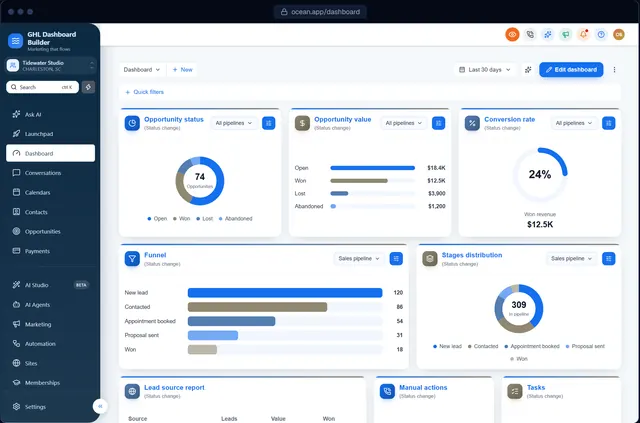
You sold a brokerage on instant lead replies, showing reminders and a nurture campaign for past clients. Then the agents log in and see a bright blue interface that looks nothing like the brokerage’s charcoal-and-gold brand, a menu that calls their buyers and sellers Contacts and their deals Opportunities, and a dozen modules nobody will open between showings. The software works. It just does not feel like the brokerage’s own system, and agents who already juggle an MLS, a transaction tool and their phone notice every extra click.
This guide shows how to set up GoHighLevel for real estate so the account fits the way agents work and looks like your agency’s own platform. HighLevel (also called GoHighLevel or GHL) has the building blocks a real estate team needs; the work is in choosing which ones to show, what to call them and how to present them. We cover what agents actually use, buyer and seller pipelines, menu wording that does not confuse anyone, colors that suit a brokerage, a step-by-step setup with HighLevel’s menu paths, keeping client data private, rolling out to a team, and the limits of branding. GHL Dashboard Builder is an independent design service and is not affiliated with HighLevel; where our product helps, we say exactly what it does and what it does not.
What does a real estate team need from GoHighLevel?
A real estate team needs HighLevel to win and keep the deal: reply to new leads fast, track buyers and sellers through separate pipelines, book showings and listing appointments, send agreements for signature and stay in touch with past clients for years. Everything else is optional, and every unused menu item is something an agent has to learn to ignore.
Think about who opens the account. In a small team it is the agents themselves, usually on a phone between appointments, plus an inside sales agent (ISA) who calls new leads, and a transaction coordinator or office manager who keeps the paperwork moving. The team leader or broker opens it to check which deals are close and whether leads are being answered. Nobody on that list wants to learn CRM vocabulary.
Here is how the main HighLevel modules map to a real estate team’s daily work.
| HighLevel module | What a real estate team uses it for | Typical user |
|---|---|---|
| Conversations | Texts, emails, web chat and social messages from leads and clients in one inbox | Agents, ISA |
| Contacts | Buyers, sellers, past clients, referral partners and vendors | Everyone |
| Opportunities | Buyer and seller deals moving from enquiry to closing | Agents, team leader |
| Calendars | Showings, listing appointments, buyer consultations, open-house sign-ups | Agents, ISA |
| Automation (workflows) | Instant lead replies, showing reminders, long-term nurture, review requests | Agency, team leader |
| Sites | Landing pages for listings, home-valuation offers and open houses | Agency |
| Marketing | Email newsletters, market updates, social posting | Team leader, agency |
| Reputation | Review requests after closing | Team leader |
| Reporting | Lead sources, response times, campaign results | Team leader, agency |
Three HighLevel features fit real estate especially well. HighLevel’s pipelines and opportunities give each deal a card on a board, with stages you name yourself, which suits the long and uneven path of a home sale. HighLevel’s Custom Objects real estate case study shows how a sub-account can keep a Properties record with its own details, linked to clients and vendors. And HighLevel’s Send Documents & Contracts workflow action can send a document for signature automatically when a deal reaches a stage.
What HighLevel is not, for most teams, is the system of record for the transaction. Listings data lives in the MLS, offers and disclosures usually live in a transaction-management tool, and commission accounting lives elsewhere. Be clear about that line on day one and design the dashboard for the jobs HighLevel will really do: leads, conversations, appointments, follow-up and relationships.
Why does a branded CRM matter to real estate agents?
Agents are their own brand, and so are brokerages. A listing presentation, a yard sign, a website and an email signature all carry the same logo and colors, and a generic software screen breaks that the moment an agent opens it in front of a client or a new recruit. A branded dashboard keeps your agency’s platform consistent with the brokerage and makes the system feel built for them.
The audience is large, which is why many agencies build a real estate niche. NAR’s own reporting put membership at more than 1.4 million Realtors in mid-2025, according to its update on membership running above forecast. And agents stay central to the transaction: NAR’s top 10 takeaways from the 2025 Profile of Home Buyers and Sellers report that 88% of buyers and 91% of sellers used a real estate professional.
Source: National Association of REALTORS, Top 10 Takeaways from NAR's 2025 Profile of Home Buyers and Sellers
NAR’s press release on the 2025 Profile found that first-time buyers fell to 21% of the market, the lowest share since NAR began collecting the data in 1981, with a median age of 40. For an agency that means a real estate client’s database is weighted toward repeat buyers and sellers, people who bought before and will sell again. Long-term nurture and staying in touch with past clients are where HighLevel’s automation earns its place.
None of these numbers says a branded dashboard wins an agent more listings, and we will not claim it does. What a branded, simplified dashboard does is practical: agents find things faster because the menu uses their words, the broker sees your agency’s platform rather than a resold tool, and recruits joining the team see a system that looks like the brokerage’s own. Those are the reasons agencies give real estate clients their own look.
How does GHL Dashboard Builder set up GoHighLevel for real estate?
GHL Dashboard Builder is an independent design service that turns the standard HighLevel (GoHighLevel) dashboard into a branded platform: your colors, menu, login design, privacy mode and your clients’ language, installed with two lines of code. For real estate, the relevant pieces are the Estate template, the menu editor, the opportunities board, privacy mode, single sub-account targeting, the welcome banner and the login design.
The Estate template
Estate is our real estate template and one of 27 templates. It uses warm neutrals, a charcoal header and brass highlights, with elegant serif headings and a clean sans-serif body font, and it moves HighLevel’s menu into a charcoal bar across the top of the screen. The menu comes with Contacts renamed to Clients and Opportunities renamed to Listings, and Launchpad, AI Studio, Memberships and the App Marketplace hidden. The header carries a New listing button. Its login design is a full-screen photo of a home with the sign-in card on one side and the headline “Welcome home”. You can see it on the Estate template page and try it with your client’s logo and colors in the free builder.
What each feature does for a real estate team, and which plan includes it
| Feature | What it does for the brokerage’s agents | Plan |
|---|---|---|
| Estate template | A warm, premium design with Clients and Listings already in the menu | Starter and up |
| Brand and colors | The brokerage’s own colors, fonts and logo across HighLevel | Starter and up |
| Opportunities board | Branded stage headers and deal cards on HighLevel’s pipeline board | Starter and up |
| Welcome banner | A greeting with the agent’s first name, date, clock and quick links to today’s showings and messages | Starter and up |
| Appointments board | The next appointments from every calendar in a card at the top of the Dashboard | Starter and up |
| Notification pop-ups | New messages, bookings and payments slide in with Reply, Mark read and Call | Starter and up |
| Privacy mode | An eye button that blurs client names, emails, phone numbers, conversations and deal values | Starter and up |
| Single sub-account | The design shown only in the brokerages you choose, by link or Location ID | Starter and up |
| Menu editor | Your own wording for any of HighLevel’s 19 menu items, plus reorder, hide, favourites and live counts | Pro |
| Login page design | 12 login designs in the brokerage’s colors on your white-label sign-in page | Pro |
| Languages and right-to-left | The menu and navigation in 15 languages, with Arabic, Urdu and Hebrew right-to-left | Pro |
| A look designed by our team | A design built from scratch from a brokerage’s brand | Agency |
On the Starter plan you use the Estate template’s layout and menu as they come, including Clients and Listings. Choosing your own wording, such as Deals or Transactions, needs the Pro plan’s menu editor. If you want the Estate look without its sample content, replace the login page’s sample quote panel with your own text or a highlights panel; never publish a quote from a person who did not say it.
How it installs and what the agents see
The builder produces the CSS and JavaScript for the design, and you install it with two short lines in HighLevel’s Custom Code boxes under Settings, Company, Whitelabel, Custom Code, which takes about five minutes. Change the design later, press Deploy to live, and HighLevel picks up the new version without re-pasting. On Pro and Agency we install it for you.
After the install, agents log in on your white-label domain and see the brokerage’s colors, Clients and Listings in the top bar, and a shorter menu without the tools they never use. Turn on the welcome banner and the Dashboard greets each agent by first name with quick links to today’s appointments. HighLevel’s own white-label settings still handle the domain, logo and mobile app; our design restyles the web interface in the browser, and our guide to white-labeling HighLevel explains what those built-in settings cover.
On data: the builder never connects to your HighLevel account, and the installed code changes styling and menu labels only. It does not read or send your clients’ data anywhere. Our features page lists everything that installs into HighLevel.
Should Opportunities be called Listings? Wording the real estate menu
Use the words agents already say: Clients rather than Contacts, and a pipeline name that matches the team’s business. Listings is right for a listing-heavy team; Deals or Transactions is safer for a team that works both buyers and sellers. Keep the rest of the menu where HighLevel users expect it and hide what the team will never open.
HighLevel does not offer a setting to rename its main menu items. Agencies do it with custom JavaScript added at agency level, which our guide to HighLevel custom CSS explains, including why hand-written code needs care after platform updates. Our hub guide to GoHighLevel dashboard customization lists every part of the menu and dashboard you can change and what needs code.
The Listings question
Renaming Opportunities to Listings creates one real trade-off. In HighLevel, every deal is an opportunity, whichever pipeline it sits in. If the team runs a buyer pipeline too, a buyer who is touring homes appears under a menu item called Listings, and new agents will look for that buyer somewhere else. Three options work:
- Listings, for teams where most deals are seller-side, or where buyers are handled by a separate team in another sub-account.
- Deals, for teams that work both sides and want one plain word. Agents understand it immediately.
- Transactions or Pipeline, for brokerages whose office staff already use that word in their transaction-management tool.
Ask the team leader which word agents use in their weekly meeting, and use that one.
Here is a menu map that works for most real estate teams. Treat it as a starting point.
| HighLevel calls it | Suggested label | Show or hide | Why |
|---|---|---|---|
| Contacts | Clients | Show | Covers buyers, sellers and past clients; Leads also works for ISA-heavy teams |
| Opportunities | Listings, Deals or Transactions | Show | Match how the team describes its deals |
| Calendars | Calendars, or Showings or Appointments | Show | Keep the original if agents already know it |
| Conversations | Conversations or Messages | Show | The inbox agents check between appointments |
| Sites | Sites or Websites | Show if used | Listing pages and home-valuation offers |
| Memberships | Hide | Rarely used by real estate teams; Estate hides it | |
| Payments | Payments | Hide unless used | Few teams take payments in HighLevel |
| Reputation | Reviews | Show | Review requests after closing |
| Launchpad and App Marketplace | Hide | Agency territory, not the agent’s |
Of HighLevel’s 19 menu items, the Estate template renames two, hides four and keeps the rest in their usual order, so agents who have used HighLevel before do not have to relearn where things are.
Source: GHL Dashboard Builder Estate template, October 2026
Live counts help agents here. With the menu editor, the Listings or Deals item can show a live count of new opportunities, and Conversations can show unread messages, so an agent opening the dashboard on a phone sees at a glance whether a lead is waiting.
How should buyer and seller pipelines look in GoHighLevel?
Run two pipelines, one for buyers and one for sellers, because the steps are different. Name each stage after something that happened, not a feeling: Consultation booked is a fact, Warm is not. Keep each pipeline to six to eight stages so agents move cards instead of debating which column a deal belongs in.
HighLevel’s help center describes a pipeline as the overall sales process and a stage as one step in it, and you create both under Opportunities, Pipelines in the sub-account, as its getting-started guide to pipelines and opportunities shows. Pipeline names must be unique within a sub-account.
A buyer pipeline that reflects how buying works now
The written buyer agreement deserves its own stage. NAR’s reminder about the practice change explains that since August 17, 2024, agents working with a buyer must have a written agreement in place before touring a home, including live virtual tours. Some states have added their own rules on top of that. The brokerage’s broker or attorney decides what the agreement says; your job is to make sure the pipeline does not let a deal reach Touring without it.
A buyer pipeline that works for most teams:
- New lead — enquiry from an ad, portal, website or referral.
- Contacted — the agent or ISA has spoken to the person.
- Consultation booked — a buyer consultation is on the calendar.
- Agreement signed — the written buyer agreement is signed.
- Touring — showings are under way.
- Under contract — an offer has been accepted.
- Closed — keys handed over; move the contact into past-client nurture.
- Not now — a lead who is not ready, with a reason and a follow-up date.
HighLevel’s Documents & Contracts can send the brokerage’s agreement for e-signature, and the Send Documents & Contracts workflow action can send it directly or create it as a draft for the agent to review first. Draft is the safer choice for a legal document; the agent checks the details before the client sees it.
A seller pipeline
- New seller lead — often from a home-valuation page.
- Listing appointment booked
- Listing agreement signed
- Preparing to list — photos, staging, pricing.
- Active — on the market.
- Under contract
- Closed
- Not now
Where property details belong
Opportunities track deals; they are a poor place to store a home’s details. HighLevel’s Custom Objects can hold a Properties record with fields such as address, price, property type and square footage, and HighLevel’s article on associations between opportunities, companies and custom objects uses exactly this real estate example: properties linked to opportunities and companies so buyers, listings and agencies appear together. Check the current object limits for your HighLevel plan in the help center before you design the setup, because HighLevel has changed them over time.
Our guide to GoHighLevel pipeline customization goes deeper on stages, card fields and how the board looks once it is branded.
Which colors and design suit a real estate dashboard?
Brokerages usually want calm, premium and trustworthy: warm neutrals or white backgrounds, a dark charcoal or navy for structure, and one accent such as gold, brass or a deep green. That works well on screen, as long as every piece of text has enough contrast with what sits behind it. The usual mistake is putting small text in the gold accent on a white background.
The W3C’s accessibility guidance sets a minimum contrast ratio of 4.5 to 1 for normal text. Agents read the dashboard on phones in bright sunlight outside a listing and in dim cars between showings, so readability is a practical concern as well as an accessibility one.
We measured five color pairs from our own Estate template with the WCAG contrast formula. Charcoal on cream and white on charcoal are extremely readable. Brass works on the charcoal header and with dark text on it. Brass text on white does not pass.
Source: Calculated with the WCAG 2.2 contrast formula from the Estate template's colors, October 2026. Minimum for normal text: 4.5 to 1.
Three lessons follow. First, use the gold or brass accent for backgrounds of active items, thin lines and icons on dark surfaces, and put dark text on it rather than white; white on Estate’s brass scores only 2.85 to 1. Second, if the brokerage’s gold is lighter than Estate’s, the gap gets worse, so test the brokerage’s exact hex code before you promise it as a text color. Third, keep muted grey text dark enough: Estate’s muted grey scores 5.21 to 1 on its cream background and 5.71 to 1 on white cards, comfortably above the minimum.
Design choices that work for real estate
- A dark top bar with a light canvas. A charcoal or navy bar gives structure, and a cream or white work area keeps long client lists easy to scan.
- Serif headings, plain body text. A serif for headings looks like the brokerage’s print materials; the body stays in a plain sans-serif so phone numbers, addresses and times are easy to read.
- Comfortable spacing. Real estate lists are shorter than a call center’s, so a little more space looks premium without hiding anything.
- Square or slightly rounded corners. Luxury and traditional brokerages suit sharper shapes; a modern team that sells to first-time buyers may prefer softer, rounded cards.
- One accent color. Reserve gold or brass for the action that matters on each screen.
Not every real estate client wants a warm, traditional look. A tech-forward team or a property-management company may prefer a crisp, modern design. Browse the template gallery and apply the same contrast rule to whichever one you start from.
How do you set up GoHighLevel for a real estate team, step by step?
Build the account first, then brand it, then test it with the agents who will use it. Branding is easier to adjust once pipelines, calendars and the menu are final, and testing with an agent on a phone catches problems an admin at a desk never sees. Menu paths below match HighLevel’s help center at the time of writing; HighLevel moves things occasionally.
Step 1: Build the account
- Create the brokerage’s sub-account from the agency view and set the time zone and business hours under the sub-account’s Settings, Business Profile.
- Register for business texting before you send a single text. In the US, HighLevel’s A2P 10DLC campaign registration guide walks through brand and campaign registration under Settings, Phone System, Trust Center. Carriers make the final decision, so start early; instant lead replies by text are the heart of most real estate setups.
- Create the buyer and seller pipelines under Opportunities, Pipelines, with the stages from the previous section.
- Create calendars: a buyer consultation calendar, a listing appointment calendar and, if the team uses it, a showing request calendar. Give each agent their own availability.
- If the team wants property records, create a Properties custom object under the sub-account’s objects settings and add only the fields agents will really fill in.
- Upload the brokerage’s approved buyer and listing agreements as templates in Documents & Contracts. Do not write the agreements yourself.
- Build the core workflows under Automation: an instant reply to new leads with a booking link, a reminder before every consultation and showing, a long-term nurture sequence for Not now leads, a past-client check-in on the purchase anniversary and a review request after closing.
- Connect the brokerage’s Google Business Profile under Reputation, Settings so review requests go to the right listing.
- Add a user for each agent, the ISA and the office manager, with only the permissions they need. Agents who only work their own leads rarely need Automation or Settings.
Step 2: Brand the dashboard
- Complete the identity layer at agency level under Settings, Company: logo, white-label domain and legal links.
- Choose or design the theme: colors, menu wording, hidden items, welcome banner.
- In the agency view, open Settings, Company, Whitelabel and scroll to Custom Code. HighLevel’s Agency Settings article describes this area as the place for custom CSS and JavaScript.
- Copy whatever is already in the Custom CSS and Custom JavaScript boxes into a text file as your rollback.
- Paste the new CSS and JavaScript and save. HighLevel shows a warning about third-party scripts; read it and confirm only if you trust the code.
- Open the brokerage’s sub-account in a new tab and refresh.
Step 3: Test with real users
- Log in as an agent, not as an admin, on a phone, and walk through a normal day: a new lead arrives, the agent replies, books a consultation and moves the card.
- Repeat as the ISA, checking that new leads and unread messages are obvious.
- Repeat as the office manager, sending a test agreement to yourself as a draft.
- Check every dropdown, pop-up and table for readable text, especially anything using the brokerage’s gold or accent color.
- Ask one agent to find three things without help, and note where they hesitate.
That is 20 steps across three stages. The first stage takes the longest and holds the brokerage’s real value; the branding stage is short because the design is chosen before you start.
How do you keep client data private at open houses, demos and team meetings?
Use sample data for every demo and training video, and blur real data whenever you have to show a live brokerage account. Real estate work is full of shared screens: sales calls with new teams, weekly pipeline meetings on a conference-room TV, coaching sessions recorded for new agents, and a sign-in tablet at every open house.
Each one can expose something sensitive. A pipeline review on a big screen shows client names next to offer amounts. A recorded training video shows a seller’s phone number. An open-house tablet left on the contact list shows every visitor who signed in before. A buyer’s pre-approval amount in a deal card is exactly the kind of detail a client would not want a stranger to see.
A practical routine for any agency serving real estate teams:
- Build a demo sub-account. Fill it with clearly fake clients, deals and conversations. Use it for every sales call and every training video.
- Never record in a live brokerage account unless client data is hidden first.
- Close the conversations panel before you share a screen; message previews are the most common leak.
- Share one browser tab, not your whole screen, so notifications and other clients’ accounts stay private.
- Keep the open-house tablet on the sign-in form, not on the contact list, and lock it between visitors.
- Agree how pipeline meetings run. Show the board with values blurred, and open a single deal only when the team discusses it.
- Write the routine down and give it to every agent, assistant and contractor you train.
Clients trust the brokerage with their finances, their address and their plans to move, and the brokerage trusts its agency with the same. Our guide to hiding client data in GoHighLevel covers screen-sharing habits in more depth.
Privacy mode is a visual safeguard on your own screen. It does not encrypt anything, change who can access records or replace the routine above; it makes the routine easier to follow when you are moving quickly between clients.
How do you roll GoHighLevel out to a team of agents?
Train agents on four jobs, not on HighLevel: replying to a new lead, booking an appointment, moving a deal and sending a review request. Agents are independent and busy, many are part-time or newly licensed, and they will use whatever gets them back to clients fastest. A renamed, trimmed menu makes that training shorter, because every item they see is one they will use.
The best slot is usually straight after the team’s weekly meeting, when agents are already in the office or on the call. Fifteen minutes a week over a month works better than one long workshop that half the team misses.
| Week | Session (about 15 minutes) | Done when |
|---|---|---|
| 1 | Logging in on the brokerage’s address and on the mobile app, the menu, the welcome screen | Every agent can log in and find Clients and Conversations |
| 2 | Replying to new leads and booking consultations | Each agent replies to a test lead and books a test consultation |
| 3 | Moving deals through the buyer and seller pipelines, including Agreement signed | Each agent moves a test deal from New lead to Touring |
| 4 | Review requests and past-client check-ins | The team leader sends one review request to a test contact |
Hold the sessions in the brokerage’s own account with privacy mode on, or in the demo sub-account if you are recording. Record each session once with sample data, so agents who join next quarter can watch it.
Three habits make the first months smoother:
- Name one owner at the brokerage. Usually the team leader or office manager. Changes to wording, pipelines and users go through that person.
- Agree a channel for questions. One shared thread is better than agents messaging different people at the agency.
- Review after 30 days. Ask which menu items nobody opened and hide them. Ask what agents still call things, and rename to match.
The welcome banner and appointments board help here. A greeting with the agent’s first name and quick links to today’s appointments and conversations gives every day a clear starting point, and the appointments board shows the next showings and consultations without anyone opening a calendar. Notification pop-ups add a “Hey {name}” message with Reply and Call buttons when a new lead texts in, which suits agents who live on speed of response.
Should every brokerage in your agency get the same look?
Not necessarily. Agencies that serve real estate alongside other industries often want brokerage sub-accounts to look like Estate without changing everyone else’s dashboard. A brokerage with several offices may want its own colors across all of them, while your other clients keep your agency brand.
Agency-level custom code in HighLevel applies across the interface your users see, including sub-account views. To give one brokerage its own look, the theme has to check which sub-account is open, using its Location ID, and apply the design only there. HighLevel shows the Location ID in the web address when you open a sub-account. Our guide to GoHighLevel sub-account branding walks through finding it and testing the result.
Situations where a separate look makes sense:
- A premium brokerage. A luxury team pays for a fully branded platform in its own colors and name.
- A pilot. You want to test a real estate design on one team before rolling it out to all of them.
- A mixed agency. Your brokerages get Clients, Listings and a warm theme; your gyms and clinics keep their own wording. Our setup guide for gyms and fitness studios and our guide for dental and medical practices show how other industries word the same menu.
- A multi-office brokerage. Each office is a sub-account, and all of them should share the brokerage’s look.
Be exact with clients about one thing: from one install, one design is shown in the sub-accounts you choose. If several brokerages each want a different look, talk to us about how to set that up.
What if agents or clients speak another language?
Translate the menu for the people who use it every day. Many brokerages have agents who work more comfortably in another language, and in some markets the whole team does. A menu in their language removes small hesitations that add up across a busy week of showings.
In the United States, bilingual teams often serve Spanish-speaking buyers; our market page for the United States lists Estate among its suggested templates and notes Spanish for bilingual clients, and our Spanish dashboard guide compares HighLevel’s own Spanish setting with a branded Spanish menu. In the Gulf, many teams switch between Arabic and English all day; our United Arab Emirates market page suggests Estate too. Arabic needs a right-to-left layout, which HighLevel does not provide on its own, and Estate supports right-to-left. All 15 menu languages are on the languages page.
Two limits to explain to the brokerage up front:
- The menu and navigation can be translated by a theme; HighLevel’s own pages follow HighLevel’s language settings. That includes HighLevel’s builders, system emails and the mobile app. Check the screens agents use most, such as conversations and calendars, before promising a fully translated system.
- Client-facing messages are separate. Lead replies, showing reminders and nurture emails are written in the workflow builder, in whatever language the brokerage chooses. Write them with the team, in its voice, rather than by machine translation.
What can go wrong, and what doesn’t branding solve?
Most problems come from treating branding as more than it is, or from skipping the test with agents on their phones. A theme is custom code running in the browser. HighLevel provides the place for it but does not officially support it, so a HighLevel update can occasionally leave part of a screen unstyled until the theme is refreshed.
| Problem | Why it happens | What to do |
|---|---|---|
| Agents cannot find a buyer under Listings | Buyer deals sit in the same menu item as listings | Rename to Deals or Transactions, or keep buyers in their own sub-account |
| Gold text is hard to read | Brass or gold on white falls below 4.5 to 1 | Use gold for active items and lines, with dark text on it |
| A deal reaches Touring with no signed agreement | An agent drags the card past the Agreement signed stage | Have a workflow alert the team leader when a deal enters Touring, and review the board weekly |
| New-lead texts are blocked or filtered | Business texting is not registered | Complete A2P 10DLC registration before launch |
| Part of a screen loses its styling after an update | HighLevel changed that screen’s structure | Update the theme; keep a rollback copy of the old code |
| Client names and offers appear in a training video | Recorded in a live account without blur | Use the demo sub-account; review recordings before sharing |
| Your support team cannot find Contacts | The brokerage’s menu says Clients | Keep a one-page map of renamed items for your team |
| The broker wants the mobile app in their colors too | The design restyles the web interface only | Use HighLevel’s own white-label mobile app options |
What branding will never do
- It will not change HighLevel’s features, data, permissions or billing.
- It will not change the HighLevel mobile app, the emails HighLevel sends, or client-facing forms and pages; those follow HighLevel’s own settings and builders.
- It will not connect HighLevel to the MLS, replace a transaction-management tool or make a document legally compliant. Agreements and disclosures are the brokerage’s responsibility.
Being clear about these limits in the sales conversation protects you. A broker who knows exactly what they are buying is less likely to be disappointed later.
DIY code, a developer or a ready-made design: which suits a real estate agency?
All three can produce a branded real estate dashboard. The difference is how much time each takes and who keeps it working after HighLevel updates. For an agency with one or two brokerages, cost and speed usually decide; for an agency building a real estate niche, maintenance matters most.
| Route | Good for | Watch out for |
|---|---|---|
| Write your own CSS and JavaScript | Agencies with a developer and time to maintain code | Finding selectors, testing every screen, fixing breaks after updates |
| Hire a freelance developer | A one-off custom look | Who fixes it after the next HighLevel update, and at what cost |
| Start from a ready-made design such as Estate | Fast, consistent results across many brokerages | Templates cover common needs; a unique look needs more design work |
If you write your own, start with the safe approach in our custom CSS guide. If you would rather start from a finished design, GHL Dashboard Builder’s plans are one-time payments with no monthly fee: Starter at US$180 for one design from a template such as Estate, Pro at US$280 for up to 3 designs with your own menu wording, a branded login page, 15 languages and installation by us, and Agency at US$880 for up to 100 designs, a look designed by our team, custom code and lifetime updates. Starter and Pro include 12 months of updates, then optional at US$99 a year. Full details are on the pricing page.
What to do next
- Agree the line with the broker. Write down which jobs HighLevel will do (leads, conversations, appointments, pipelines, agreements, nurture, reviews) and which stay in the MLS and transaction tools.
- Register business texting and build a demo sub-account with fake clients before your first sales call or training video.
- Draft the pipelines and menu map with the team leader: buyer and seller stages, Agreement signed before Touring, and whether deals should read Listings, Deals or Transactions.
- Try the Estate look on HighLevel’s screens in the free builder with the brokerage’s colors and logo, and check the contrast of every gold or accent label.
- Roll out to one brokerage first, run the four weekly training sessions, and review hidden items and wording after 30 days.
If you would rather have the design done for you, or your real estate clients need something no template covers, get in touch and tell us about the teams you serve.