

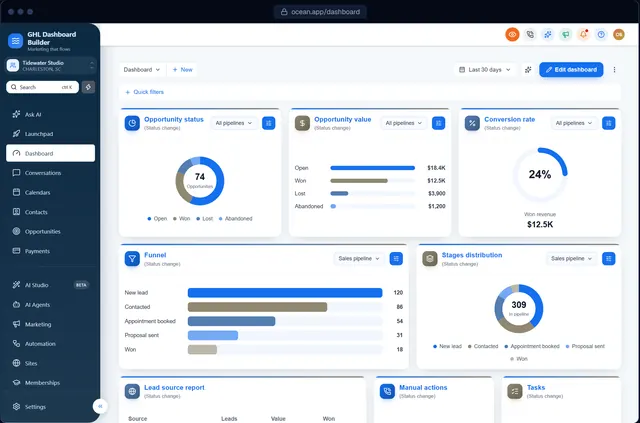
You sold a law firm on instant replies to new enquiries, consultation reminders and a review request after every closed matter. Then the partners log in and see a bright, generic interface, a menu that calls their clients Contacts and their matters Opportunities, and a dozen modules nobody at the firm will ever open. An insurance agency or a financial advisor has the same reaction with policies and households. The software works. It just does not feel like the firm’s own system, and professionals who sell discretion notice anything that looks careless.
This guide shows how to set up GoHighLevel for law firms, insurance agencies and financial advisors so the account fits the way these firms work and looks like your agency’s own platform. HighLevel (also called GoHighLevel or GHL) has the building blocks; the work is choosing which ones to show, what to call them, how to present them and how to keep client information off shared screens. We cover what these firms use HighLevel for, menu wording, intake pipelines, discreet colors, a step-by-step setup with HighLevel’s menu paths, privacy, the compliance questions to raise with the firm, and the limits of branding. GHL Dashboard Builder is an independent design service and is not affiliated with HighLevel. Nothing here is legal or compliance advice; the firm’s own counsel and compliance officer decide what its rules require.
What do law firms, insurance agencies and financial advisors need from GoHighLevel?
All three need HighLevel for the front of the client relationship: answer enquiries fast, book consultations, track each prospective matter or policy through intake, send engagement documents for signature and follow up on renewals, reviews and referrals. Case files, policy administration and portfolio records stay in the firm’s specialist systems.
That line is the most important decision you make with a professional-services client. A law firm already has (or should have) case-management, document-management and trust-accounting tools. An insurance agency has an agency management system and carrier portals. A registered financial advisor has a custodian, a portfolio system and an archiving tool chosen by compliance. HighLevel does not replace any of these well, and trying to make it do so creates duplicate records and confused staff.
What these firms usually lack is a fast, consistent intake and follow-up process. Enquiries arrive by web form, phone, chat and ads; someone has to reply, qualify, book and remind. That is exactly where HighLevel is strong.
Here is how HighLevel’s main modules map to each type of firm.
| HighLevel module | Law firm uses it for | Insurance agency uses it for | Financial advisor uses it for |
|---|---|---|---|
| Conversations | Replies to new enquiries, consultation confirmations | Quote follow-ups, renewal reminders | Meeting confirmations, if compliance approves the channel |
| Contacts | Prospective and current clients, referral sources | Households and businesses insured | Prospects, clients and centers of influence |
| Opportunities | Matters from enquiry to engagement | Quotes and policies from request to bound | Prospects from discovery meeting to onboarding |
| Calendars | Free or paid consultations, by practice area | Quote reviews and annual coverage reviews | Discovery, planning and review meetings |
| Automation | Intake replies, reminders, review requests | Quote chasers, renewal sequences, cross-sell | Meeting reminders, annual review scheduling |
| Documents and contracts | Engagement letters for e-signature | Applications and agency forms where carriers allow | Client agreements approved by compliance |
| Reputation | Review requests after a closed matter, where the bar allows | Review requests after a claim or renewal | Often restricted; check the firm’s marketing rules |
| Reporting | Enquiry sources and response times | Quote volume and close rates | Meetings booked and sources |
Two HighLevel features fit these firms especially well. HighLevel’s Send Documents & Contracts workflow action can send a document for e-signature automatically, or create it as a draft for a person to review first, which suits engagement letters. And HighLevel’s sub-account user roles and permissions can restrict a user to their own assigned contacts and opportunities, which matters when an associate or a junior agent should not see every client.
Why does a discreet, branded CRM matter to these firms?
Law, insurance and advice firms sell trust. Their letterhead, website and office are designed to look careful and composed, and a generic software screen breaks that the moment a partner opens it in a meeting. A discreet, branded dashboard keeps your agency’s platform consistent with the firm and makes it feel built for them.
There is also a professional duty underneath the look. The American Bar Association’s Model Rule 1.6 on confidentiality includes paragraph (c), added in 2012, which asks a lawyer to make reasonable efforts to prevent the inadvertent or unauthorized disclosure of, or unauthorized access to, information relating to the representation of a client. States adopt their own versions of the rule, but the idea is the same everywhere: the firm is responsible for how client information is handled, including by vendors and the agency that runs its CRM.
Financial firms have their own version of that duty. The FTC’s Safeguards Rule requires non-bank financial institutions, such as mortgage brokers, to run an information security program, and the FTC’s 2023 amendment added a duty to report a breach of unencrypted information affecting 500 or more consumers to the FTC within 30 days of discovery. Insurance agents answer to their state insurance regulators instead, and many states have adopted security rules for licensees.
None of this says a branded dashboard makes a firm compliant, and we will not claim it does. What a careful, simplified dashboard does is practical: staff see only the modules they need, the menu uses the firm’s words, client data can be hidden before anyone shares a screen, and the partners see your agency’s platform rather than a resold tool. In a profession that judges vendors by how carefully they handle details, those things count.
How does GHL Dashboard Builder set up GoHighLevel for law and finance firms?
GHL Dashboard Builder is an independent design service that turns the standard HighLevel (GoHighLevel) dashboard into a branded platform: your colors, menu, login design, privacy mode and your clients’ language, installed with two lines of code. For law and finance firms, the relevant pieces are two industry templates, the menu editor, privacy mode, the opportunities board, the login design and single sub-account targeting.
The Counsel template, for law firms and advisors
Counsel is one of our 27 templates. It pairs navy and oxblood with serif headings on a warm off-white canvas, keeps HighLevel’s own menu on a deep navy sidebar, and uses square-ish corners, outline buttons and almost no shadows, so it reads as formal and structured rather than flashy. The menu comes with Contacts renamed to Clients and Opportunities renamed to Matters, and it hides Launchpad, AI Studio, AI Agents, Memberships and the App Marketplace. The header carries a New matter button. Its login design is an inset photo of a library hall beside a brand panel, with the headline “Secure client portal”, the Google sign-in button switched off and the footer line “Confidential. Authorized users only.” You can see it on the Counsel template page.
The Harbor template, for insurance and finance teams
Harbor uses steel teal and sea green with HighLevel’s menu moved into a bar across the top of the screen. Contacts become Clients and Opportunities become Policies, Launchpad, Memberships, AI Studio and Media Storage are hidden, and favourites are switched on so each person can pin the pipelines they use. Payments shows a live count. Its welcome banner greets each user with “Renewals, quotes and client follow-ups” at the business, and its privacy mode uses solid bars instead of a blur. The login design is a split layout with a soft mesh background; its side panel carries a sample line attributed to the fictional “Harbor Insurance Group”, which you should replace with the client’s own tagline or a highlights panel. See it on the Harbor template page, and try either template with your client’s logo and colors in the free builder.
What each feature does for the firm, and which plan includes it
| Feature | What it does for the firm’s staff | Plan |
|---|---|---|
| Counsel or Harbor template | A formal or corporate design with Matters or Policies already in the menu | Starter and up |
| Brand and colors | The firm’s own colors, fonts and logo across HighLevel | Starter and up |
| Privacy mode | An eye button that blurs client names, emails, phone numbers, conversations and deal values | Starter and up |
| Opportunities board | Branded stage headers and matter or policy cards on HighLevel’s pipeline board | Starter and up |
| Welcome banner | A greeting with the user’s first name, date, clock and quick links to today’s work | Starter and up |
| Appointments board | The next consultations and reviews from every calendar at the top of the Dashboard | Starter and up |
| Single sub-account | The design shown only in the firms you choose, by link or Location ID | Starter and up |
| Menu editor | Your own wording for any of HighLevel’s 19 menu items, plus reorder, hide, favourites and live counts | Pro |
| Login page design | 12 login designs in the firm’s colors on your white-label sign-in page | Pro |
| Languages and right-to-left | The menu and navigation in 15 languages, with Arabic, Urdu and Hebrew right-to-left | Pro |
| A look designed by our team | A design built from scratch from the firm’s brand guidelines | Agency |
On the Starter plan you use the template’s layout and menu as they come, including Matters or Policies. Choosing other wording, such as Cases, Files or Households, needs the Pro plan’s menu editor. Our features page describes all 18 features.
How it installs and what the firm sees
The builder produces the CSS and JavaScript for the design, and you install it with two short lines in HighLevel’s Custom Code boxes under Settings, Company, Whitelabel, Custom Code, which takes about five minutes. Change the design later, press Deploy to live, and HighLevel picks up the new version without re-pasting. On Pro and Agency we install it for you.
After the install, staff log in on your white-label domain and see the firm’s colors, Clients and Matters (or Policies) in the menu, and none of the tools they will never use. HighLevel’s own white-label settings still handle the domain, logo and mobile app; our design restyles the web interface in the browser. The builder never connects to your HighLevel account, and the installed code changes styling and menu labels only; it does not read or send client data anywhere. That is a point worth making to a managing partner or compliance officer before they ask.
Matters, Policies or Clients: how should the menu be worded?
Use the words the firm already uses in its own meetings: Clients rather than Contacts everywhere, then Matters for a law firm, Policies or Quotes for an insurance agency, and Prospects or Pipeline for an advisor. Keep the rest of the menu where HighLevel users expect it and hide what the firm will never open.
HighLevel does not offer a setting to rename its main menu items at the time of writing. Agencies do it with custom JavaScript at agency level, as our guide to renaming GoHighLevel menu items explains step by step, including the difference between hiding an item and removing a user’s permission to use it.
Choosing the word for Opportunities
Every deal in HighLevel is an opportunity, whichever pipeline it sits in, so the word you choose has to cover everything in that menu item.
- Matters is the standard word in law firms, and it covers both prospective matters in intake and engaged ones. Some firms prefer Cases (common in personal injury and immigration practices) or Files.
- Policies suits an agency whose pipelines track renewals and bound business. An agency whose pipeline is mostly new-business quotes may prefer Quotes; one that tracks both might use Accounts.
- Prospects or Pipeline suits a financial advisor whose HighLevel pipeline stops at onboarding, because the ongoing client relationship lives in the custodian and planning software.
Ask the managing partner or principal which word staff use on Monday mornings, and use that one.
A menu map for professional-services firms
| HighLevel calls it | Law firm | Insurance agency | Financial advisor | Show or hide |
|---|---|---|---|---|
| Contacts | Clients | Clients | Clients or Households | Show |
| Opportunities | Matters or Cases | Policies or Quotes | Prospects or Pipeline | Show |
| Calendars | Consultations | Appointments | Meetings | Show |
| Conversations | Messages | Messages | Messages, if approved | Show or hide by compliance decision |
| Payments | Invoices | Payments | Hide unless used | |
| Memberships | Hide (both templates hide it) | |||
| Reputation | Reviews | Reviews | Show only where the firm’s rules allow reviews | |
| Launchpad and App Marketplace | Hide; agency territory |
Of HighLevel’s 19 menu items, Counsel renames two and hides five; Harbor renames two, hides four and adds a live count to Payments. Both keep everything else in HighLevel’s usual order, so staff who have used HighLevel before do not have to relearn where things are.
Source: GHL Dashboard Builder Counsel and Harbor templates, October 2026
Live counts help busy teams here. With the menu editor, Matters or Policies can show a count of new opportunities and Conversations can show unread messages, so a receptionist or intake coordinator sees at a glance whether an enquiry is waiting.
How should intake pipelines look for legal, insurance and advisory work?
Build one pipeline per type of work, and name each stage after something that happened, not a feeling: Consultation booked is a fact, Warm is not. For a law firm the critical stage is the conflict check; for an insurance agency it is the quote; for an advisor it is the discovery meeting. Keep each pipeline to six to eight stages.
You create pipelines and stages under Opportunities, Pipelines in the sub-account. Our guide to GoHighLevel pipeline customization covers stages, card fields and how the board looks once it is branded.
A law firm intake pipeline
- New enquiry — a form, call, chat or referral.
- Contacted — someone at the firm has spoken to the person.
- Conflict check — the firm checks for conflicts of interest in its own system before discussing details.
- Consultation booked
- Engagement letter sent — sent as a draft for the lawyer to review, then for e-signature.
- Engaged — letter signed and retainer arranged; the matter moves to the case-management system.
- Declined or referred out — with a reason, and a non-engagement letter if the firm uses one.
The conflict check deserves its own stage because it stops a matter from moving forward before the firm knows it can act. The check itself happens in the firm’s conflicts database, not in HighLevel; the stage simply makes the step visible and lets a workflow alert the responsible lawyer.
Automated replies are also worth a word with the firm. The ABA’s comment on Model Rule 7.3 treats live, real-time contact with prospective clients differently from written communications such as text messages, which recipients can easily ignore. States adopt their own versions, though, and Pennsylvania’s version of Rule 7.3 treats text messages as person-to-person contact. Replying to someone who contacted the firm is different from reaching out first, but let the firm’s lawyers confirm what their state allows before you switch on any outbound text campaign.
An insurance agency pipeline
- Quote requested
- Contacted
- Information gathered — details needed for the quote.
- Quoted
- Bound — the policy is placed; details go into the agency management system.
- Renewal due — a separate renewal pipeline works better for agencies with many policies.
- Lost — with a reason and a follow-up date for the next renewal window.
Consent rules for calls and texts are a live topic in insurance lead generation. The FCC adopted a “one-to-one” consent rule for marketing calls and texts in 2023, and in January 2025 the US Court of Appeals for the Eleventh Circuit vacated it in Insurance Marketing Coalition v. FCC, as Morrison Foerster’s summary of the decision explains. The underlying consent requirements of the Telephone Consumer Protection Act still apply, so an agency buying leads should check how consent was collected before loading those contacts into HighLevel.
A financial advisor pipeline
- New prospect
- Discovery meeting booked
- Discovery meeting held
- Proposal or plan presented
- Agreement signed — using the firm’s approved client agreement.
- Onboarding — accounts opened at the custodian.
- Not now — with a follow-up date.
Which colors and design suit a law or finance dashboard?
Law and finance firms usually want composed and trustworthy: navy, charcoal or deep teal for structure, a light neutral canvas, serif headings for a law firm or a clean sans-serif for an insurer, and one restrained accent. That works well on screen, as long as every piece of text has enough contrast with what sits behind it.
The W3C’s accessibility guidance sets a minimum contrast ratio of 4.5 to 1 for normal text. Lawyers and advisors often read long client lists late in the day, and older partners and clients may read the screen in a meeting room, so readability is a practical concern as well as an accessibility one.
We measured color pairs from our own Counsel and Harbor templates with the WCAG contrast formula. Counsel’s navy and oxblood are dark enough that white text on either passes comfortably. Harbor’s sea green is the weak spot: white text on it falls below the minimum, while dark text on the same green passes.
Source: Calculated with the WCAG 2.2 contrast formula from the Counsel and Harbor template colors, October 2026. Minimum for normal text: 4.5 to 1.
Three lessons follow. First, in Harbor, put dark text on the sea green, or keep the green for lines, icons and status dots rather than white labels; if the client’s brand green is lighter still, the gap gets worse. Second, muted grey text needs checking too: Counsel’s muted grey scores 5.52 to 1 on its canvas and Harbor’s 5.05 to 1, both above the minimum, but a lighter grey chosen to look elegant can easily drop below it. Third, test the firm’s exact hex codes before you promise a brand color as a text color.
Design choices that suit professional firms
- A dark sidebar or top bar with a light canvas. Navy or charcoal gives structure; an off-white or white work area keeps long lists easy to scan.
- Serif headings for law, sans-serif for insurance and finance. A serif looks like the firm’s letterhead; an insurer or fintech-style advisor often prefers a plain, modern face such as Harbor’s IBM Plex Sans.
- Flat surfaces and thin borders. Counsel uses no shadows at all, which reads as calm and serious.
- One accent color, used sparingly. Oxblood or green for the action that matters on each screen, not for decoration.
- A sober login page. No Google button for staff accounts if the firm manages sign-ins centrally, and a short confidentiality line under the form, as Counsel does.
Not every firm wants a traditional look. A modern immigration practice or a digital insurance broker may prefer something lighter; browse the template gallery and apply the same contrast rule to whichever design you start from.
How do you set up GoHighLevel for a law firm or insurance agency, step by step?
Build the account first, then brand it, then test it as a real staff member would. Branding is easier to adjust once pipelines, calendars and permissions are final, and testing as a junior user catches access problems an admin never sees. Menu paths below match HighLevel’s help center at the time of writing; HighLevel moves things occasionally.
Step 1: Agree the boundaries
- Write down, with the managing partner or principal, which jobs HighLevel will do (enquiries, consultations, intake pipeline, engagement documents, reminders, reviews) and which stay in the firm’s specialist systems.
- Ask the firm’s compliance officer or general counsel three questions in writing: may staff text clients from HighLevel, which messages must be archived and how, and which client information must never be entered in HighLevel at all.
- Record the answers; they decide which modules you show and what the workflows may say.
Step 2: Build the account
- Create the firm’s sub-account and set the time zone and business hours under the sub-account’s Settings, Business Profile.
- If the firm will text, register for business texting under Settings, Phone System, Trust Center before sending anything. Carriers make the final decision on A2P 10DLC registration, so start early.
- Create the pipeline under Opportunities, Pipelines, with the stages from the previous section.
- Create calendars for each consultation type and give each lawyer, agent or advisor their own availability.
- Upload the firm’s own engagement letter or client agreement as a template in Documents & Contracts. Never draft legal or regulatory documents yourself.
- Build the core workflows under Automation: an instant reply to new enquiries with a booking link, consultation reminders, an alert to the responsible person when a matter reaches Conflict check or Quoted, and a review or renewal sequence where the firm’s rules allow it.
- Add users under Settings, My Staff. HighLevel’s roles and permissions article explains the Admin and User roles, module-by-module access and the Only Assigned Data option, which limits a user to the contacts, opportunities, appointments and tasks assigned to them.
Step 3: Brand the dashboard
- Complete the identity layer at agency level under Settings, Company: logo, white-label domain and legal links.
- Choose or design the theme: Counsel or Harbor, the firm’s colors, menu wording and hidden items.
- In the agency view, open Settings, Company, Whitelabel and scroll to Custom Code. HighLevel’s Agency Settings article describes this area as the place for custom CSS and JavaScript.
- Copy whatever is already in the Custom CSS and Custom JavaScript boxes into a text file as your rollback.
- Paste the new CSS and JavaScript and save. Read HighLevel’s warning about third-party scripts and confirm only if you trust the code.
- Open the firm’s sub-account in a new tab and refresh.
Step 4: Test as real users
- Log in as a junior user with Only Assigned Data switched on, and confirm they see only their own clients.
- Walk through a normal day as the intake coordinator: a new enquiry arrives, they reply, book a consultation and move the card to Conflict check.
- Send a test engagement letter to yourself as a draft, then for signature.
- Check every dropdown, pop-up and table for readable text, especially anything in the firm’s accent color.
- Switch on privacy mode and share your screen to a colleague to confirm what is hidden.
That is 21 steps across four stages. The first stage is the shortest but decides everything else; skipping it is how agencies end up rebuilding workflows after a compliance review.
How do you keep client information private on screen shares and recordings?
Use fictional data for every demo and training video, and hide real data whenever you must show a live firm’s account. Professional firms share screens constantly: partner meetings on a conference-room display, onboarding calls with your agency, support sessions, and recorded walkthroughs for new staff.
Each one can expose something sensitive. A pipeline on a big screen shows prospective clients’ names next to their legal problems. A recorded training video shows a policyholder’s phone number. A conversation preview shows a message about a divorce, a claim or an inheritance. Under a confidentiality duty like the one in ABA Model Rule 1.6(c), that kind of slip is exactly what reasonable efforts are meant to prevent.
A practical routine for any agency serving these firms:
- Build a demo sub-account. Fill it with clearly fictional clients, matters and conversations, and use it for every sales call and training video.
- Never record in a live firm’s account unless client data is hidden first.
- Close the conversations panel before you share; message previews are the most common leak.
- Share one browser tab, not your whole screen, so notifications and other clients’ accounts stay private.
- Use HighLevel’s permissions, not just the menu. Give agency staff access only to the sub-accounts they support, and switch on Only Assigned Data for firm users who should see only their own clients.
- Agree how partner meetings run. Show the board with names and values hidden, and open a single matter only when the team discusses it.
- Write the routine down and give it to every person at your agency who touches the account.
Our guide to hiding client data in GoHighLevel covers screen-sharing habits in more depth.
Privacy mode is a visual safeguard on the screen in front of you. It does not encrypt anything, change who can access records or replace the routine above; it makes the routine easier to follow when you are moving quickly between clients.
What do compliance rules mean for your HighLevel setup?
Compliance rules decide which channels a firm may use, what must be archived and who may see client data. They do not decide what the dashboard looks like. Your job as the agency is to ask the right questions before launch, build the account around the answers and never promise that HighLevel, or a theme, makes a firm compliant.
The rules differ by profession and country, so treat the table below as a list of questions to raise, not as advice.
| Rule or authority | Who it affects | Question to ask before launch |
|---|---|---|
| ABA Model Rule 1.6 and state versions | US lawyers | Which client information may be stored in HighLevel, and who at the agency may access it? |
| ABA Model Rule 7.3 and state versions | US lawyers | May the firm text prospective clients, and only in reply to enquiries? |
| SEC and FINRA record-keeping rules | Broker-dealers and registered investment advisers | Is HighLevel an approved channel, and how are its messages archived? |
| FINRA Rule 2210 | FINRA member firms | Do email and text templates count as correspondence or retail communications needing review? |
| FTC Safeguards Rule | Non-bank financial institutions such as mortgage brokers | Does the firm’s security program cover HighLevel, and who reports a breach? |
| State insurance data-security laws | Licensed insurance agents and agencies | What does the state require for vendors that hold policyholder data? |
| Telephone Consumer Protection Act | Anyone calling or texting US consumers | How was consent collected for each lead, and is it recorded? |
Why advisors should settle texting first
The strongest warning comes from the SEC’s off-channel communications cases. In its September 2022 announcement, the SEC said 15 broker-dealers and one affiliated adviser had agreed to pay combined penalties of more than $1.1 billion, after employees discussed business by text on personal devices without the records being kept. Further batches followed: 10 firms paying $79 million in September 2023, 16 firms paying more than $81 million in February 2024, and 26 firms paying more than $390 million in August 2024.
Each figure is the combined civil penalty the SEC announced for that group of firms. Source: SEC press releases 2022-174, 2023-212, 2024-18 and 2024-98
Those cases concerned large firms and personal phones, not HighLevel. The lesson for an agency is simpler: if an advisory client’s compliance officer has not approved HighLevel’s conversations as a business channel with proper archiving, leave texting off and hide Conversations from the advisors’ menu. A clean menu makes the approved process the easy one.
Should every firm in your agency get the same look?
Not necessarily. Agencies that serve law and finance firms alongside other industries often want those sub-accounts to look like Counsel or Harbor without changing everyone else’s dashboard. A larger firm with several offices may want its own colors across all of them, while your other clients keep your agency brand.
Agency-level custom code in HighLevel applies across the interface your users see, including sub-account views. To give one firm its own look, the theme has to check which sub-account is open, using its Location ID, and apply the design only there. Our guide to GoHighLevel sub-account branding walks through finding the Location ID and testing the result.
Situations where a separate look makes sense:
- A premium firm. A law firm or wealth manager pays for a platform in its own colors and name.
- A pilot. You test Counsel on one firm before offering it to all your professional-services clients.
- A mixed agency. Your law firms see Matters and a navy theme; your clinics and brokerages keep their own wording. Our guide for dental and medical practices and our guide for real estate teams show how other industries word the same menu.
- A multi-office firm. Each office is a sub-account, and all of them share the firm’s look.
Language can matter too. A firm serving immigrant communities, or one based in Europe or the Gulf, may want the menu in another language; the menu and navigation can be shown in 15 languages, including Arabic, Urdu and Hebrew right-to-left, as the languages page lists, while HighLevel’s own pages, builders, system emails and mobile app follow HighLevel’s language settings. Our United Kingdom market page suggests Counsel for British service firms, and our guide to white-labeling GoHighLevel in the UK covers British date formats and data-protection expectations.
Be exact with clients about one thing: from one install, one design is shown in the sub-accounts you choose. If several firms each want a different look, talk to us about how to set that up.
What can go wrong, and what doesn’t branding solve?
Most problems come from treating HighLevel as a system of record it was not designed to be, or from skipping the compliance conversation. A theme is custom code running in the browser. HighLevel provides the place for it but does not officially support it, so a HighLevel update can occasionally leave part of a screen unstyled until the theme is refreshed.
| Problem | Why it happens | What to do |
|---|---|---|
| Staff keep case notes or policy details in HighLevel | No one agreed where records live | Write the boundary down in Step 1 and hide modules that invite duplicate records |
| An associate sees every client in the firm | Users were added with full access | Use the User role with Only Assigned Data where appropriate |
| An advisor texts a client from HighLevel without approval | Conversations was left in the menu | Settle texting with compliance first; hide Conversations if it is not approved |
| White labels are hard to read in Harbor | White on sea green scores 3.04 to 1 | Use dark text on the green, or keep the green for lines and icons |
| A matter skips the conflict check | A card was dragged past the stage | Alert the responsible lawyer when a card enters Consultation booked without a conflict result |
| A client’s name appears in a training video | Recorded in a live account | Use the demo sub-account and review recordings before sharing |
| Part of a screen loses its styling after an update | HighLevel changed that screen’s structure | Update the theme; keep a rollback copy of the old code |
| The firm wants the mobile app in its colors | The design restyles the web interface only | Use HighLevel’s own white-label mobile app options |
What branding will never do
- It will not change HighLevel’s features, data storage, permissions, archiving or billing.
- It will not make HighLevel a case-management, agency-management or portfolio system, or make any message or document compliant.
- It will not change the HighLevel mobile app, the emails HighLevel sends, or client-facing forms and pages; those follow HighLevel’s own settings and builders.
Being clear about these limits in the sales conversation protects you. A managing partner who knows exactly what they are buying is far less likely to be disappointed, and far more likely to trust you with the next firm.
DIY code, a developer or a ready-made design: which suits a professional-services agency?
All three can produce a discreet, branded dashboard for a law or finance firm. The difference is time and who keeps it working after HighLevel updates. For an agency with one firm, cost and speed usually decide; for an agency building a legal or insurance niche, consistency and maintenance matter most.
| Route | Good for | Watch out for |
|---|---|---|
| Write your own CSS and JavaScript | Agencies with a developer and time to maintain code | Finding selectors, testing every screen, fixing breaks after updates |
| Hire a freelance developer | A one-off custom look | Who fixes it after the next HighLevel update, and at what cost |
| Start from a ready-made design such as Counsel or Harbor | Fast, consistent results across many firms | Templates cover common needs; a firm’s full brand system needs more design work |
If you write your own, our guide to HighLevel custom CSS shows the safe approach. If you would rather start from a finished design, GHL Dashboard Builder’s plans are one-time payments with no monthly fee: Starter at US$180 for one design from a template such as Counsel or Harbor, Pro at US$280 for up to 3 designs with your own menu wording, a branded login page, 15 languages and installation by us, and Agency at US$880 for up to 100 designs, a look designed by our team, custom code and lifetime updates. Starter and Pro include 12 months of updates, then optional at US$99 a year. Full details are on the pricing page.
What to do next
- Agree the boundary with the firm. List the jobs HighLevel will do and the ones that stay in case-management, agency-management or advisory systems.
- Put three questions to compliance in writing: texting, archiving and what must never be stored in HighLevel. Build the menu around the answers.
- Draft the pipeline and menu map with the managing partner or principal: Conflict check, Quoted or Discovery meeting as real stages, and Matters, Policies or Prospects as the menu word.
- Try Counsel or Harbor on HighLevel’s screens in the free builder with the firm’s colors and logo, and check the contrast of every accent-colored label.
- Roll out to one firm first with a demo sub-account for training, permissions set per user, and a review of hidden items and wording after 30 days.
If you would rather have the design done for you, or your clients need a look no template covers, get in touch and tell us about the firms you serve.