

You have set up your logo and your own login domain, and a client still says, “Oh, this is HighLevel.” Then you look at the options for going further and find three very different answers: free CSS themes on forums and blogs, freelancers offering custom builds, and theme services promising a finished look. They all claim to white-label GoHighLevel. They don’t cost the same, they don’t take the same time, and they don’t fail in the same way.
This guide compares the GoHighLevel white label options side by side so you can choose with clear eyes. HighLevel (also called GoHighLevel or GHL) gives every agency a set of built-in white-label settings; beyond those, you can write custom CSS yourself, hire a developer, or use a done-for-you theme. We cover what each route really includes, what it costs in money and hours, the risks, which route fits a 3-client, 10-client or SaaS-mode agency, and the step-by-step setup for each. GHL Dashboard Builder is one of the done-for-you options and is an independent service, not affiliated with HighLevel, so we name our own trade-offs too.
What are the GoHighLevel white label options?
There are four GoHighLevel white label options: HighLevel’s built-in white-label settings, do-it-yourself custom CSS and JavaScript, a developer who writes that code for you, and a done-for-you theme from a builder or design service. The built-in settings are the foundation for everyone; the other three are different ways to change how the interface looks.
It helps to separate two layers, because most confusion comes from mixing them up:
- Identity layer. Where clients log in, which logo they see, which domain appears in links, what the mobile app is called. HighLevel handles this layer through its own settings, and no theme replaces it.
- Interface layer. The colors, fonts, sidebar, menu wording and order, the Dashboard itself, the login design, the language direction, and what shows on a shared screen. HighLevel’s settings change only a little of this layer. Everything else is done with custom code added at agency level.
So the real question is rarely “built-in or custom CSS”. It is “built-in plus which way of handling the interface layer”. Here is the short version of each route before we go into detail.
| Option | What you get | Who does the work | Money | Main risk |
|---|---|---|---|---|
| Built-in white label only | Your domain, logo, branded links, renamed objects, custom menu links | You, in HighLevel’s settings | Included in the HighLevel plan that offers it | The interface still looks like HighLevel |
| DIY custom CSS and JavaScript | Whatever you can write and test | You | Your time | Hours on every screen, and again after updates |
| Hire a developer | A bespoke theme to your brief | A freelancer or agency | A project fee, then paid fixes | Brief gaps, code nobody else can maintain |
| Done-for-you theme | A finished, tested design and install code | The provider, with your choices | A plan price | You get what the product covers |
The rest of this guide takes each route in turn, then compares them on effort, cost, risk and result, and ends with a recommendation by agency size.
What does HighLevel’s built-in white label cover?
HighLevel’s built-in white label covers the identity layer: a white-label domain for the web app, your agency logo and favicon, a branded API domain for system-generated links, renamed Contacts and Opportunities objects in each sub-account, custom menu links, and, as paid extras, a white-label mobile app and SaaS mode for reselling.
Here is what each built-in setting does, with HighLevel’s own documentation:
- White-label domain. HighLevel’s guide to setting up a whitelabel domain for the desktop web app explains how clients log in at an address such as
app.youragency.cominstead of a shared HighLevel address. This is the single most visible white-label setting. - Logo, favicon and company details. These live in the agency view under Settings, Company, described in HighLevel’s Agency Settings article, which also describes the Custom Code area where agencies add their own CSS and JavaScript.
- API domain for links. HighLevel’s article on branding system-generated links explains that an agency-level API domain becomes the default for forms, surveys, calendar, trigger, payment and review links in all sub-accounts, and a sub-account can override it with its own.
- Object names. HighLevel now lets an admin rename standard objects such as Contacts and Opportunities inside a sub-account, under Settings, Objects, with a singular and a plural name. This is set one sub-account at a time.
- Custom menu links. HighLevel’s guide to custom menu links shows how an agency adds its own items to the agency or sub-account sidebar, limits them to roles and rearranges those custom links.
- Multiple brands. For agencies that sell more than one product, HighLevel’s SaaS Multi-Brands overview describes managing several brand identities in one account, each with its own branding and domain settings.
Which HighLevel plan you need
The built-in options are tied to HighLevel’s plans. At the time of writing, HighLevel’s pricing page lists three main plans at $97, $297 and $497 a month, with the branded desktop app on your own domain under the Unlimited plan and above and SaaS mode under the Agency Pro plan. HighLevel’s pricing guide lists the white-label mobile app as an add-on at $497 a month or $1,491 a quarter. Plans and add-ons change, so check both pages on the day you decide.
The white-label mobile app is an add-on on top of a plan. Source: gohighlevel.com/pricing and HighLevel Help Center, HighLevel Pricing Guide, checked October 2026. Prices can change.
The point for this comparison: everything in this section is paid for through your HighLevel subscription, and every other option sits on top of it. None of the routes below replaces the domain, logo or mobile app settings.
Where does the built-in white label stop?
The built-in white label stops at the interface. It doesn’t recolor HighLevel’s sidebar, buttons and pages in your palette, reorder or hide HighLevel’s own menu items for everyone, design the login page beyond your logo, switch the menu to right-to-left, hide client data on screen shares, or give one client a different look.
These are the gaps agencies notice first, usually because a client points them out:
- The look is still HighLevel’s. Your logo sits on HighLevel’s standard colors and layout, the same interface every other agency resells. Clients who have seen another agency’s account recognize it.
- The menu order and contents are HighLevel’s. Renaming objects changes the names of Contacts and Opportunities. It doesn’t rename every menu item, move items into the order a client works in, or hide modules they will never use. Reordering HighLevel’s built-in items has been a long-standing request on HighLevel’s ideas board, such as the thread asking for the ability to reorder menu items.
- Renames are per sub-account. The object rename is set inside each sub-account. That is useful for one client, but an agency with 30 dental practices repeats the same change 30 times and keeps it consistent by hand.
- No right-to-left. HighLevel’s interface translations are mostly European languages at the time of writing, and the interface doesn’t switch to right-to-left, so Arabic, Urdu and Hebrew teams read a left-to-right English menu. Our guide to an Arabic GoHighLevel dashboard covers what that means in practice.
- No per-client look. Agency Custom Code applies across the interface. A request on HighLevel’s ideas board asks for per sub-account customization of colors, CSS and JavaScript, which shows agencies want it and that it isn’t a built-in setting.
- Nothing for screen shares. Demos and support calls show real client names, numbers and deal values unless you hide them yourself.
Each of the other three options exists to fill these gaps. They differ in who writes the code and who keeps it working. Our guide to renaming GoHighLevel menu items explains the native object rename in detail and where custom JavaScript takes over.
How does GHL Dashboard Builder fit among the options?
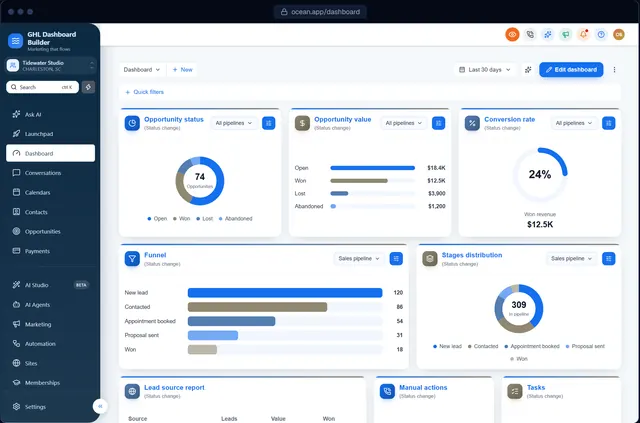
GHL Dashboard Builder is the done-for-you route. GHL Dashboard Builder is an independent design service that turns the standard HighLevel (GoHighLevel) dashboard into a branded platform: your colors, menu, login design, privacy mode and your clients’ language, installed with two lines of code. You design visually, we produce and maintain the code.
In practice, that means you start from one of 27 templates in the free builder, add your logo and colors, check the result on desktop, tablet and phone, and then choose a plan. We tailor the design with you, and you receive one CSS line and one JavaScript line for HighLevel’s Custom Code boxes. It sits on top of HighLevel’s built-in white label; it doesn’t replace your domain, logo or mobile app settings.
What each feature does for your clients, and which plan includes it
| Feature | What it does for your clients | Plan |
|---|---|---|
| Brand and colors | Your color system, fonts and favicon across HighLevel’s screens | Starter and up |
| Sidebar and header | HighLevel’s own sidebar in your colors, icon styles, hover menus and a branded sub-account switcher | Starter and up |
| Templates | 27 finished designs, including industry looks with their own menu wording | Starter and up |
| Welcome banner | A greeting with the user’s first name, date, clock and quick links on the Dashboard | Starter and up |
| Privacy mode | An eye button that blurs names, emails, phone numbers, conversations and deal values | Starter and up |
| Single sub-account | The design shown only in the sub-accounts you choose, by link or Location ID | Starter and up |
| Menu editor | Your own wording, order and visibility for HighLevel’s 19 menu items, with live counts | Pro |
| Login page design | 12 login designs in your colors for your white-label sign-in page | Pro |
| Languages and right-to-left | The menu and navigation in 15 languages, with Arabic, Urdu and Hebrew right-to-left | Pro |
| Installation by us | We paste the two lines and check the result | Pro |
| A look designed by our team, custom code | A design built from your brand guidelines, plus your own CSS and JavaScript | Agency |
All 18 features are described on our features page. The language feature translates the dashboard’s menu and navigation and lets you write your own wording for any label; text inside HighLevel’s own pages, builders, system emails and the mobile app follows HighLevel’s language settings.
What it costs, and what “one-time” means
There are three plans, all one-time payments with no monthly fee: Starter $180 (1 design), Pro $280 (up to 3 designs, with the menu editor, login page, 15 languages and installation by us) and Agency $880 (up to 100 designs, a look designed by our team, custom code and lifetime updates). Starter and Pro include 12 months of updates; after that, updates are optional at $99 a year, and the theme keeps working as it is without them. Details are on the pricing page.
One-time payments. Designs included: Starter 1, Pro up to 3, Agency up to 100. Source: GHL Dashboard Builder pricing, October 2026
What your clients see afterwards
After the install, a client logs in on your white-label domain and sees your colors on the sidebar, header, buttons and cards, a greeting with their first name on the Dashboard, and a menu in their words, in their language from Pro. Your team gets an eye button for screen shares. HighLevel’s features work exactly as before; the theme changes how HighLevel looks and what its menu says, not what it does or the data in it. The builder never connects to your HighLevel account, and the installed code doesn’t send data anywhere.
What does do-it-yourself custom CSS really cost?
Do-it-yourself custom CSS costs no money and a lot of time. You find each element in your browser’s developer tools, write a rule, test it on every main screen, and repeat after HighLevel updates. It suits agency owners who know CSS and enjoy the work; for everyone else, the hours are the price.
The appeal is real. You control every pixel, you pay nothing beyond your HighLevel plan, and you can start tonight. Free CSS themes shared on blogs and forums make it even easier to get a first result: paste a stylesheet into Settings, Company, Whitelabel, Custom Code, save, and the sidebar changes color.
The costs show up later:
- Coverage. A copied theme usually styles the screens its author cared about. Dropdowns, pop-ups, settings pages and newer modules often keep HighLevel’s colors, and you find them one at a time, sometimes when a client sends a screenshot.
- Readability. A dark sidebar with mid-grey text looks stylish and fails for people reading on a bright laptop. Checking contrast is part of the job, and our HighLevel custom CSS guide covers how to do it.
- Menu changes need JavaScript. CSS can recolor and hide. Renaming items consistently, adding live counts or switching the menu to right-to-left needs JavaScript, which is a step up in skill and in what can go wrong.
- Upkeep. HighLevel doesn’t officially support custom code. When a release changes the page structure a selector depends on, the rule stops working silently. You are the one who notices, and the one who fixes it.
Putting a number on your time
Your hours are worth something even when no invoice is sent. The US Bureau of Labor Statistics’ Occupational Outlook Handbook lists a 2025 median pay of $47.85 an hour for web developers and digital designers. The table below multiplies that figure by a range of hours. The hours are examples, not measurements; put in your own estimate.
| Hours you spend on the theme | Value at $47.85 an hour |
|---|---|
| 5 hours (paste a free theme, fix the obvious gaps) | $239 |
| 10 hours (style the main screens, test them) | $479 |
| 20 hours (full coverage, menu changes in JavaScript) | $957 |
| 40 hours (the above plus fixes after updates over a year) | $1,914 |
The arithmetic isn’t an argument against doing it yourself. If you enjoy CSS, learning it pays off across every client. It is an argument for counting the hours honestly before you assume the free option is the cheap one.
Should you hire a GHL developer for a custom theme?
Hire a developer when you need something no product offers: an unusual layout, deep integration with your own tools, or code you want to own outright. Expect to write a detailed brief, review every screen, and pay again whenever HighLevel changes something the code depends on.
A good front-end developer produces a clean, bespoke result. The work around the code is what agencies underestimate:
- The brief. You have to list every screen and state you care about: the Dashboard, Conversations, Calendars, Contacts, Opportunities, Payments, Settings, empty states, dropdowns, mobile widths. Anything left out of the brief is left out of the theme.
- The review. You test what you receive, on several browsers and screen sizes, with an agency user and a sub-account user. That takes hours too.
- Ownership. Agree in writing that you own the code and receive it in readable form, not only as a minified file that only the author can change.
- Maintenance. Ask what happens after HighLevel’s next big release. A fixed monthly retainer, an hourly rate for fixes, or nothing at all are all common answers, and they lead to very different costs over a year.
- Continuity. If the developer moves on, the next one has to learn the old code before fixing it.
There is no standard price for a GoHighLevel theme, and we won’t invent one. Use the BLS median above as a sense check for hourly quotes, compare what each quote includes (screens, menu changes, languages, fixes), and weigh the first build and a year of upkeep together, not the first invoice alone.
A developer is also the right call alongside a done-for-you theme in some cases: for example, a custom integration that has nothing to do with the look. Keep the two pieces of code separate so one can be updated without breaking the other.
How do the GoHighLevel white label options compare?
Compared on effort, cost, risk and result, the built-in settings are fast but stop at identity; DIY is cheapest in money and most expensive in time; a developer is the most flexible and needs the most management; a done-for-you theme is the fastest way to a full result, limited to what the product covers.
| Built-in only | DIY custom CSS and JS | Hire a developer | Done-for-you theme | |
|---|---|---|---|---|
| Skills you need | Comfort with HighLevel settings and DNS | CSS, JavaScript, developer tools | Writing a brief, reviewing work | Visual choices |
| Time to first result | An afternoon | Days to weeks | Weeks, including brief and review | Minutes to a few days |
| Money | Included in your HighLevel plan | Your time | Project fee, then paid fixes | A plan price |
| Colors across the app | No | Yes, screen by screen | Yes, within the brief | Yes |
| Menu wording, order, hiding | Object names, per sub-account | JavaScript you write | Extra scope | Built in (on our Pro plan) |
| Login page | Your logo | CSS you write | Extra scope | 12 designs (on our Pro plan) |
| Right-to-left menus | No | Complex JavaScript | Specialist work | Built in (on our Pro plan) |
| Different look per client | No | Code that checks the sub-account | Extra scope | By link or Location ID |
| After a HighLevel update | Nothing to fix | You find and fix it | You pay for a fix | Provider updates the theme |
| Who you call when it breaks | HighLevel support | Yourself | Your developer, if available | The provider |
Three things in this table matter more than the rest for most agencies.
Upkeep decides the real cost. The built-in settings never need attention again. Any custom code does. Price the route over a year, not on the first day.
Coverage decides what clients notice. Clients judge the screens they use daily: the Dashboard, Conversations, Calendars and the pipeline. A route that styles most of the app beautifully and leaves Conversations in default colors still says “this is HighLevel”.
Responsibility decides your weekends. With DIY code, a broken layout after an update is your problem. With a developer, it is theirs if your agreement says so. With a done-for-you theme, it is the provider’s, within the updates the plan includes.
Which option fits a 10-client agency?
A 10-client agency usually does best with the built-in settings plus a done-for-you theme. If all ten clients share your agency brand, one design is enough (Starter or Pro). If several clients need their own look, count the designs: Pro covers up to 3, Agency up to 100. DIY or a developer makes sense only with in-house skills or unusual needs.
The right answer depends less on size than on two questions: whose brand do clients see, and how many different looks do you need? Here is how that plays out for common agency shapes.
| Your agency | Brand clients see | Sensible route | Why |
|---|---|---|---|
| Freelancer, 1 to 3 clients | Yours | Built-in settings, then a theme when a client asks | Keep costs low until branding is part of what you sell |
| 10 clients, one niche (for example dental) | Yours, with industry words | Built-in plus one design with an industry template | One design, one menu wording, every client consistent |
| 10 clients, mixed niches | Yours | Built-in plus one design, wording kept general | Specific wording for one niche confuses the others |
| 10 clients, 3 premium clients with their own brand | Theirs, for those 3 | Built-in plus Pro (up to 3 designs) | A design for each premium client, limited to their sub-accounts |
| SaaS-mode reseller, many sub-accounts | Your product’s brand | Built-in, SaaS mode, one strong design | The product must look the same for every new customer |
| Many clients, each with its own brand | Theirs | Agency plan (up to 100 designs), or a developer | The number of looks drives the choice |
| Arabic, Urdu or Hebrew clients | Yours, in their language | Built-in plus a theme with right-to-left menus | HighLevel doesn’t switch to right-to-left |
| In-house front-end developer | Yours | DIY, if the developer has time for upkeep | Skills already paid for |
A worked example: the 10-client agency
Take an agency with ten sub-accounts: seven local service businesses under the agency’s brand and three larger clients who want their own colors and logo.
- Set up the built-in white label once: domain, logo, API domain, legal links.
- Make one design in the agency’s brand for the seven, with general menu wording.
- Make three more designs, one for each larger client, each limited to that client’s sub-account.
That is four designs. Pro includes up to 3, so this agency either brings one large client under the agency design or takes the Agency plan, which includes up to 100 designs and leaves room to grow. If the three larger clients are happy with the agency look, Starter’s single design covers all ten. Our guide to GoHighLevel sub-account branding walks through targeting chosen sub-accounts and finding each Location ID.
What does each option cost in time?
In time, the built-in settings take an afternoon once DNS is ready, a done-for-you theme takes minutes to install after a day or two of design, and DIY or a developer take days to weeks, plus repeat work after updates. The steps below show where that time goes.
Setting up the built-in white label
These are the steps at the time of writing. HighLevel moves menus from time to time, so if a path has changed, search its help center for the setting name.
- In the agency view, open Settings, Company and add your agency logo, favicon and company details.
- Follow HighLevel’s white-label domain guide: create the DNS record for a subdomain such as
app.youragency.com, then add it in the agency settings and wait for it to verify. - Set the agency API domain so form, calendar, payment and review links use your domain.
- In each sub-account that needs industry words, open Settings, Objects, choose Edit on Contacts or Opportunities, and enter the singular and plural names.
- Add any Custom Menu Links you want, choosing the agency sidebar, the sub-account sidebar or both, and the roles that see them.
- Decide on the mobile app: the standard LeadConnector app or the white-label add-on, and write the choice into your onboarding email.
- Log in as a sub-account user on the white-label domain and check what a client sees.
Installing a done-for-you theme
- Design in the builder, or approve the design the provider sends, on desktop, tablet and phone.
- In the agency view, open Settings, Company, Whitelabel and scroll to Custom Code.
- Paste the CSS line into Custom CSS and the JavaScript line into Custom JavaScript.
- Save and refresh. With GHL Dashboard Builder this takes about five minutes, and on Pro and Agency we install it for you.
- Check the Dashboard, Conversations, Calendars and the pipeline as a sub-account user.
- To roll back, clear both boxes and save.
Writing your own theme, or briefing a developer
- List every screen and state the theme must cover.
- Inspect each one in developer tools and write or brief the rules.
- Add JavaScript for menu changes, languages or anything CSS can’t do.
- Test on several browsers and screen sizes, as agency and sub-account users.
- Install through Custom Code, then fix what you missed.
- After each significant HighLevel release, re-check every screen and repeat steps 2 to 5 where needed.
Step 6 is the one that never ends. That repeat cost is what you are buying your way out of with a maintained theme.
The DIY and developer route repeats steps 2 to 5 after significant HighLevel releases. Source: Step counts from the walkthroughs in this guide, October 2026.
The step counts look similar; the size of each step does not. “Paste the CSS line” takes seconds. “Inspect each screen and write the rules” can take days.
Can different clients get different white-label looks?
Partly with HighLevel’s own settings, fully only with code. Each sub-account can have its own API domain and object names, but the interface look comes from agency-level Custom Code, which applies everywhere. A different look per client needs code that checks which sub-account is open.
This matters most to agencies whose clients have strong brands of their own: a clinic group, a franchise, a premium client paying for “their own system”. With DIY or developer code, you write the logic that detects the sub-account and switches styles, and you maintain a list of which client gets which look.
With GHL Dashboard Builder, a design can cover the whole agency or only the sub-accounts you choose: paste each sub-account’s link or Location ID, and that client sees the design while everyone else keeps their current look. It is still one install. One design is shown in those sub-accounts; for different looks for different clients, the number of designs in your plan matters (Starter 1, Pro up to 3, Agency up to 100), and if your setup is unusual, talk to us before you buy.
A pilot is a sensible way to start whichever route you choose. Brand one friendly client’s sub-account first, gather feedback for a couple of weeks, then roll the design out. The single sub-account page shows how targeting works.
What can go wrong with each option?
Every option has a failure mode. The built-in settings leave clients recognizing HighLevel; DIY code breaks quietly after updates; a developer can leave you with code nobody else understands; a done-for-you theme can’t go beyond what the product covers and also needs updates after big HighLevel releases.
Built-in only
- Clients recognize the software. Anyone who has used another agency’s HighLevel account knows the interface. That is not a problem for every agency, but it is a problem if you sell “your platform”.
- Per-sub-account settings drift. Object names and sub-account domains are set one by one. Keep a checklist; our GoHighLevel white-label checklist lists 25 items in the order that saves time.
- DNS mistakes. A white-label domain that isn’t verified means clients see errors or the shared address. Test before the first client logs in.
DIY custom CSS and JavaScript
- Silent breakage. A selector that stops matching doesn’t throw an error; the screen just reverts to HighLevel’s colors or, worse, hides a button.
- JavaScript mistakes are bigger. A bug in custom JavaScript can stop the menu from working for every user. Test changes on a quiet day and keep the previous version to paste back.
- Copied code you didn’t read. Only paste code you understand, from a source you trust, into an agency-wide setting.
Hiring a developer
- Brief gaps. Screens missing from the brief stay unstyled.
- Lock-in. Minified code with no source, or a developer who disappears, makes every later change expensive.
- Open-ended upkeep. Without an agreed maintenance arrangement, each HighLevel update becomes a new negotiation.
A done-for-you theme, including ours
- Limited to the product. You choose from what the builder supports. If you need a feature it doesn’t have, ask before buying; the Agency plan adds custom CSS and JavaScript for one-off needs.
- Updates still matter. HighLevel doesn’t officially support custom code, and a large update can require a theme refresh. Starter and Pro include 12 months of updates, then optional at $99 a year; Agency includes lifetime updates. Without updates, the theme keeps working as it is, but it won’t follow HighLevel’s later changes.
- The mobile app and HighLevel’s own pages. A browser theme doesn’t change the mobile app, and the language feature translates the menu and navigation, not every page inside HighLevel.
- The login page. HighLevel’s white-label settings handle the domain and logo there; our branded login designs are a Pro feature that we set up with you.
Whichever route you take, plan for demos and support calls: they show real client data. Our guide to privacy mode in GoHighLevel covers habits that help on any setup, such as a demo sub-account with fictional data, and the eye button that blurs data on our themes. For the broader background, our hub guide on how to white-label HighLevel so it looks like your own software covers the whole setup end to end.
What to do next
Pick your route by answering the two questions from earlier, whose brand clients see and how many looks you need, then take these steps:
- Finish the built-in white label first. Domain, logo, API domain and object names, using the steps above. Every other option builds on it.
- List the gaps your clients notice. Colors, menu wording, login page, language, privacy on calls, a look per client. If the list is empty, stop here.
- Count your hours honestly. If you would write the code yourself, estimate the hours for the first build and a year of fixes, and compare them with a developer’s quote and a plan price.
- Try your brand on a live preview. Open the free builder, pick a template and add your colors and logo to see what a finished theme looks like before you decide.
- Pilot on one sub-account. Whatever you choose, brand one friendly client first, fix what they notice, then roll it out to the rest. For a wider view of what the interface layer can change, see our guide to GoHighLevel dashboard customization.